Networking Foundations Without Memorizing Numbers
The One Mental Model
Think of an Azure Databricks deployment like a private business campus.
CIDR
The address plan for the campus.
VNet
The campus boundary in Azure.
Subnets
The roads or zones inside the campus.
NIC
The network adapter that lets a VM get an IP on a subnet.
NSG
The guard deciding if traffic is allowed.
UDR
The road sign deciding where traffic goes.
NAT
The official exit gate for stable outbound IP.
DNS
The phonebook that turns names into IPs.
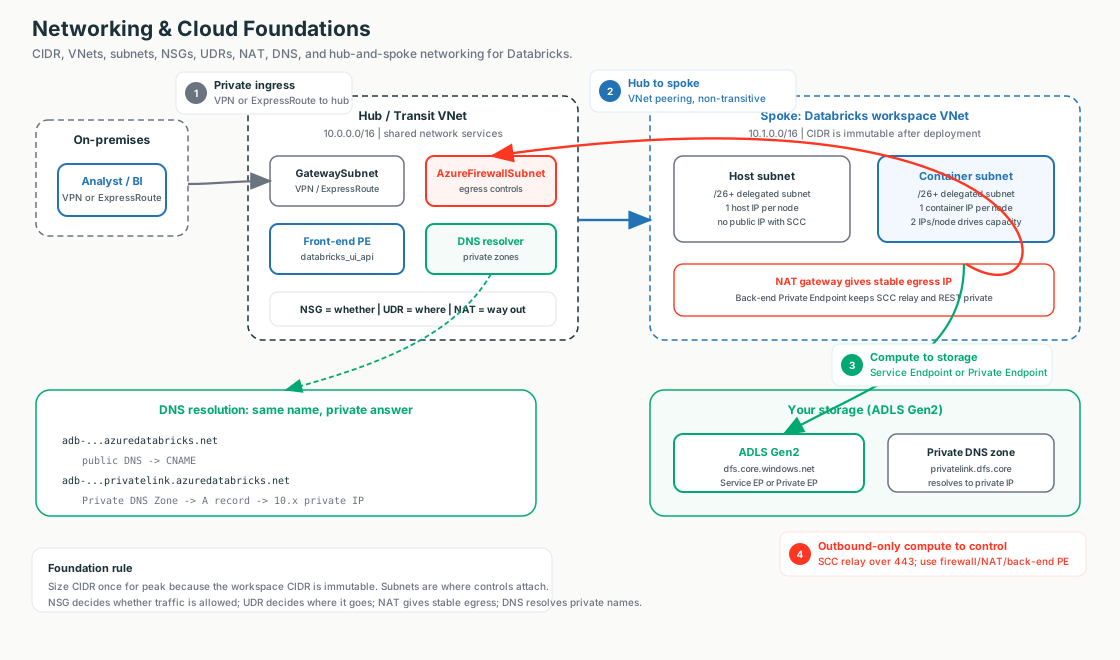
Interactive diagrams live in each tab
Each tab below has its own clickable whiteboard: Campus map → Hub & Spoke, Traffic controls → NSG / UDR / NAT, Private DNS path → DNS. Open a tab, then click a box to see what it does in plain English.
What matters for Databricks
Classic Databricks compute runs inside the customer's Azure VNet. That means the customer's network design controls how clusters start, phone home, reach storage, and exit to external systems.
CIDR: How Much Address Space Do We Have?
Start here (plain English)
Every machine on a network needs a unique number to be found, like a house needs a street address. CIDR is just the shorthand for saying "this is the block of addresses we've set aside for our neighborhood" - and the whole question on this tab is whether that block is big enough.
First, the words you'll see
- IP address - the unique number for one machine, like a house number (e.g.
10.0.4.7). - IP range / address space - a whole block of those numbers reserved together, like all the house numbers on one street.
- CIDR notation - the compact way to write a range, e.g.
10.0.0.0/24. - The "/24" part - the slash number sets the block size; a bigger slash means a smaller block (
/24= 256 addresses,/16= far more).
Simple version: CIDR is just a compact way to describe a block of IP addresses.
You do not need to memorize the math first. Remember the shape:
- Smaller slash number means bigger block.
- Bigger slash number means smaller block.
- A large workspace needs enough addresses for peak cluster size.
Databricks meaning
In Azure Databricks classic compute, every cluster node consumes subnet IP capacity. If the subnet is too small, the workspace can run out of IPs and clusters fail to start.
Customer explanation
"Before we deploy Databricks into your VNet, we need enough private address space for the biggest cluster size you expect. If the subnet is too small, the workspace can run out of IPs later."
What breaks
- Clusters stay pending.
- Autoscaling fails.
- Users see cluster start failures.
This is usually a network capacity problem, not a Spark problem.
VNet, Subnets, and NICs: Where Databricks Lives
Start here (plain English)
Think of a gated community you own inside Azure. The community wall is the VNet, the streets inside it are the subnets, and the NIC is the driveway that connects one house (a VM) to a street so it gets an address. Databricks compute parks its machines on streets inside your community.
VNet: your private network boundary in Azure.
Subnet: a smaller section inside that VNet.
NIC: Network Interface Card, the virtual adapter that lets a VM plug into a subnet and receive an IP address.
| Concept | Simple Analogy | Databricks Meaning |
|---|---|---|
| VNet | Gated community | Customer-owned private network boundary |
| Subnet | Street inside the community | Where Databricks compute resources attach |
| NIC | Driveway connection | VM network adapter that consumes an IP |
| IP address | House number | How the node is found on the network |
Databricks meaning
For classic Azure Databricks with VNet injection, Databricks uses two delegated subnets:
- Host subnet: supports the VM host side.
- Container subnet: supports the Databricks Runtime side.
So does the host subnet "contain the VM"?
Partly. A single cluster node = one Azure VM, and that VM is given two NICs — one in each subnet. The VM's host side attaches to the host subnet, but the Spark workload runs inside a container whose NIC lives in the container subnet. So one node plants a foot in both subnets.
| Subnet | Which NIC | What runs there |
|---|---|---|
| Host subnet | VM host NIC | The underlying VM / host agent — the VM attaches here |
| Container subnet | Container NIC | The Databricks Runtime container where Spark actually executes |
Why NIC matters
One node consumes one IP in the host subnet AND one IP in the container subnet. So the two subnets must be the same size, sized for your peak node count — if either runs out of IPs, clusters can't scale or even start.
Naming gotcha
Azure historically calls these the "public" (host) and "private" (container) subnets. With SCC / No Public IP enabled (the default), the "public" host subnet does not actually hand out public IPs — the name is legacy. Both NICs are private.
Customer explanation
"Databricks compute uses your subnets like parking spaces. Each cluster node needs space in both the host and container subnets. If those streets are too short, we run out of parking."
NSG, UDR, and NAT: Allowed, Routed, and Exiting
Start here (plain English)
Picture a piece of traffic trying to leave your network. Three different jobs decide its fate: a guard checks if it's even allowed out, a road sign tells it which way to go, and an exit gate stamps it with a return address. Those three jobs are NSG, UDR, and NAT - and they're easy to mix up, so each answers a different question.
NSG
Network Security Group - the guard that decides is this traffic allowed? A list of allow/deny rules on a subnet or NIC.
UDR
User-Defined Route - the road sign that decides where does it go next? It points traffic to a firewall, the hub, or straight out.
NAT gateway
The exit gate that decides which IP does it leave as? It gives outbound traffic one stable public address.
This is the core foundation for Databricks networking conversations.
Interactive: click the boxes
Click NSG, UDR, or NAT to see how a packet is allowed, routed, and given a stable exit IP.
| Control | Question It Answers | Analogy | Databricks Use |
|---|---|---|---|
| NSG | Is traffic allowed? | Security guard | Allow or deny traffic for compute subnets |
| UDR | Where should traffic go? | Road sign / GPS | Send traffic through firewall, hub, or private path |
| NAT | Which IP does it exit as? | Official exit gate | Give clusters a stable outbound IP for allowlists |
NSG = allowed?
An NSG is a rulebook on a subnet or network interface. It checks whether traffic is allowed or blocked.
UDR = routed where?
A UDR is a custom route. It tells Azure which next hop traffic should take.
NAT = exits as which IP?
A NAT Gateway gives outbound traffic a stable public source IP. This helps when downstream systems need to allowlist Databricks traffic.
Do all three only fire for outbound traffic to public/Azure services?
No — each has a different scope, and this is a common mix-up:
| Control | Direction it governs | Outbound-to-public only? |
|---|---|---|
| NAT Gateway | Outbound to the internet only | Essentially yes — it source-NATs egress to public destinations |
| UDR | The "leaving the subnet" (egress) direction | No — routes all egress: internet, Azure services, on-prem, other VNets, private paths |
| NSG | Both inbound and outbound, plus east-west | No — also governs traffic inside your VNet |
The nuance
NAT is the only one that's truly outbound-to-internet — Private Endpoints, Service Endpoints, and on-prem traffic all bypass it. UDR steers any egress next hop, public or private. NSG is bidirectional and also enforces the worker-to-worker rules Databricks requires inside the VNet — so it fires for traffic that never leaves your network.
Customer explanation
"The NSG is the guard, the UDR is the road sign, and the NAT Gateway is the official exit gate. Together they decide whether cluster traffic is allowed, where it goes, and what IP it appears from when it leaves."
What breaks
- Wrong NSG: traffic is blocked.
- Wrong UDR: traffic goes to the wrong place or gets dropped by firewall.
- Missing NAT: outbound IP is not stable enough for external allowlists.
DNS: Names Become IPs
Start here (plain English)
You type a name, but the network only travels by number. DNS is the lookup that turns the name into the right number - like a phonebook turning a person's name into their phone number. The catch for private networking: the same name can point to two different numbers, and you need it to give the private one.
DNS is the phonebook of the network. Humans use names; networks use IP addresses.
Interactive: click the boxes
Click the boxes to see why a Private Endpoint only works when DNS resolves the name to its private IP.
Walk the diagram: the two paths in an Azure Databricks flow
The diagram shows one client and one name resolving two different ways. Trace a cluster reaching ADLS (or a user opening the workspace URL):
Public path (default — no Private Link):
- The client / cluster uses a service name (e.g. the workspace URL, or
…dfs.core.windows.net). - Default lookup hits Public DNS, which returns the service's public IP (the "normal answer").
- Traffic takes the public path to the Azure service's public endpoint.
Private path (with Private Link):
- The same client uses the same name — nothing in the app or query changes.
- A private lookup hits the Private DNS Zone linked to your VNet, whose A record points the name at the Private Endpoint's private IP inside your VNet.
- Traffic follows the private path to the Private Endpoint, then on to the Azure service (Databricks / ADLS) — never touching the public endpoint.
The only thing that changed
The name is identical on both paths — only which DNS answers differs. The Private DNS Zone override is what flips Databricks traffic from the public door to the private one.
In Azure Databricks each Private Link flow has a matching Private DNS zone:
- Front-end (user → workspace) and back-end (cluster → control-plane relay) →
privatelink.azuredatabricks.net - Storage (cluster → ADLS Gen2) →
privatelink.dfs.core.windows.net(andprivatelink.blob.core.windows.net)
Databricks meaning
When a user opens a workspace URL, or when compute reaches storage, DNS must resolve the service name to the correct endpoint.
With Private Link, DNS is critical because the same service name may need to resolve to a private IP instead of a public IP.
Public DNS vs Private DNS
Both answer the same question — "what IP does this name point to?" — but they live in different places and give different answers. The trick of private networking is making the same name resolve to a private IP from inside your VNet.
| Aspect | Public DNS | Private DNS (Private DNS Zone) |
|---|---|---|
| Who sees it | The whole internet | Only VNets linked to the zone |
| Answer it returns | The public endpoint IP | The private endpoint IP inside the VNet |
| Who manages it | Azure / the service by default | Customer-created zone, linked to the VNet (often in the hub) |
| Databricks role | Default path when no private setup exists | Makes Private Link actually usable end-to-end |
How they work together
- Public DNS is the global phonebook — by default a name like the workspace URL or
*.dfs.core.windows.netresolves to a public IP. - A Private Endpoint gives that service a private IP inside your VNet.
- A Private DNS Zone linked to the VNet overrides the name so it answers with that private IP instead of the public one.
- Result: clients inside the VNet reach the service privately; nothing outside the linked VNets is affected.
Important idea
Private networking is not only about creating a private endpoint. The name also has to resolve to the private IP — that override is the Private DNS Zone's job, not the Private Endpoint's.
Common gotcha
Private Endpoint created, but the Private DNS Zone is missing or not linked to the VNet → the name still resolves via public DNS, so traffic takes the public path. It "looks" private but isn't.
Customer explanation
"If DNS still points to the public address, traffic will not use the private path. Private Endpoint gives the service a private address; Private DNS makes the name point to that private address."
First check when it breaks
From inside the VNet, resolve the name and confirm it returns a private IP.
Hub-and-Spoke: How Enterprises Organize Networks
Start here (plain English)
Think of an airport map. One central airport (the hub) holds the shared services everyone uses; many destination airports (the spokes) are the individual workloads. Peering is the direct flight that connects a spoke to the hub. Databricks lives in one spoke and flies into the customer's shared hub.
Hub-and-spoke is a common enterprise network layout.
Interactive: click the boxes
Click each box to see where the Databricks spoke, the shared hub, and the data path live on the campus map.
| Part | Simple Meaning | Usually Contains |
|---|---|---|
| Hub | Central shared services network | Firewall, VPN/ExpressRoute gateway, DNS resolver |
| Spoke | Workload network | Databricks workspace VNet, app VNets, data VNets |
Databricks meaning
The Databricks workspace VNet is often a spoke. It peers to the hub so traffic can use central inspection, routing, DNS, and on-prem connectivity.
Who owns the hub vs the spoke?
Both VNets live on the customer side — in the customer's own Azure tenant and subscriptions. The hub is not something Databricks owns or provides, and it is not the Databricks control plane.
- Hub VNet: customer-owned, shared across all of the customer's workloads (not just Databricks). Holds firewall/NVA, VPN/ExpressRoute gateway, DNS resolver, shared Private DNS zones.
- Spoke VNet: customer-owned, one per workload. The Databricks workspace VNet (host + container subnets) is a spoke that peers to the hub.
Do you have to create two VNets?
Not necessarily. A hub is an enterprise pattern, never a Databricks requirement. The minimum is a single VNet with two delegated subnets (host + container) for VNet injection.
| Customer situation | What you create |
|---|---|
| Already runs hub-and-spoke (most regulated enterprises) | Just the spoke — peer it into the existing hub. |
| Greenfield, no hub yet | Both — but the hub is the customer's infra decision, not a Databricks ask. |
| Small / simple deployment | Zero hub — one standalone VNet with VNet injection is enough. |
Common gotcha
VNet peering is not automatically transitive. Spoke A does not automatically talk to spoke B just because both connect to the hub — spoke-to-spoke or spoke-to-on-prem traffic must be explicitly routed through the hub's firewall/gateway via UDRs.
Customer explanation
"The Databricks workspace lives in a customer-owned spoke VNet. If you already have a shared hub for firewall, DNS, and on-prem connectivity, we peer the spoke into it — we don't create or live in the hub, and a hub isn't required at all for a standalone deployment."
Customer explanation
"We put Databricks in a spoke VNet and connect it to the hub. The hub gives us central inspection, routing, DNS, and on-prem connectivity."
End-to-End: The Life of a Packet
Start here (plain English)
All four pieces are just stages a single packet passes through. The cluster's NIC (in a subnet, in a VNet) is where the packet is born. Then, in order: DNS turns the name into an IP, NSG decides if it may leave, UDR decides which way it goes, and NAT (only for the internet) stamps a public return address. Follow one packet and the whole model clicks.
Interactive: click the boxes
Click each stage to see what it does as the packet flows left → right, then branches into the public or private path.
The six steps, in order
- Born — VNet / Subnet / NIC. The cluster node is a VM with a NIC + private IP in your subnet. This is where everything happens.
- Name → IP — DNS. The node resolves the service name. Public DNS → a public IP; a Private DNS Zone → a Private Endpoint's private IP. This sets the destination.
- Allowed? — NSG. The NSG on the NIC/subnet checks the 5-tuple and allows or denies. (It also governs worker-to-worker traffic.)
- Which way? — UDR / routing. Azure matches the destination IP to the most specific route: a Private Endpoint
/32, a Service Endpoint backbone route, on-prem via the gateway, or0.0.0.0/0→ NAT / firewall. - Exit IP? — NAT. Only on the internet path, NAT source-NATs the packet to a stable public IP. Private / Service-Endpoint / on-prem paths keep the private source IP and skip NAT.
- Arrive. The packet reaches its destination — a Private Endpoint (→ ADLS / control plane) on the private path, or the internet on the public path.
The link that removes the confusion: DNS ↔ routing
DNS and UDR are a chain. The IP that DNS returns is what the router then matches. Private DNS → private IP → matches the Private Endpoint route → private path (no NAT). Public DNS → public IP → matches 0.0.0.0/0 → NAT / firewall. So "fix the DNS answer" and the routing — and whether NAT is even involved — follow automatically.
Who does what (recap)
| Piece | Question it answers | When it fires |
|---|---|---|
| VNet / Subnet / NIC | Where does the packet live? | Always — the node's private IP and home |
| DNS | What IP for this name? | First — sets the destination (public vs private) |
| NSG | Is it allowed? | Every packet, in and out, incl. worker-to-worker |
| UDR | Which next hop? | On egress — picks the path by destination IP |
| NAT | Which public source IP? | Only on the internet path (private paths skip it) |
Field Notes: How To Think During Troubleshooting
Do not start by memorizing ports. Start by asking what is happening to the packet.
| Symptom | First Thing To Think |
|---|---|
| Cluster will not start | Are the subnets out of IPs? |
| Cluster cannot reach control plane | Did NSG or UDR block outbound traffic? |
| Customer firewall sees unexpected IP | Is NAT configured for stable egress? |
| Private Link exists but traffic seems public | Does DNS resolve to private IP? |
| Spoke cannot reach on-prem | Is hub routing or peering configured correctly? |
| Storage access fails | Is storage reached by the expected route and DNS answer? |
The seven questions
- Where does the compute live?
- Which subnet does it use?
- Is traffic allowed?
- Where is traffic routed?
- What IP does traffic exit from?
- What IP does the name resolve to?
- Is the workspace connected into the enterprise hub correctly?