Architecture & Default Connectivity
The two-plane, three-door model
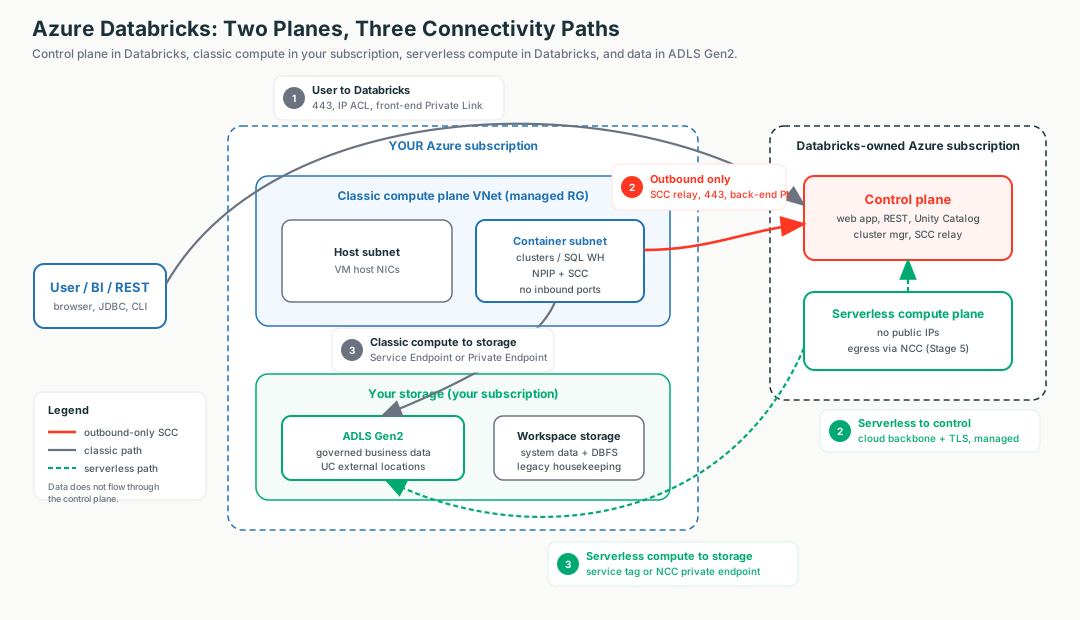
Azure Databricks is split into a control plane (the brains, run by Databricks in their subscription) and a compute plane (the muscle, where your data is processed — classic in your subscription/VNet, or serverless in Databricks'). Your data lives in your ADLS Gen2 and is read directly by compute — it never flows through the control plane.
🧠 Mental model — hold this in your head
An airport with exactly three doors. Control plane = control tower (directs, never holds cargo). Compute plane = runway + aircraft (classic = your runway; serverless = rented runway). Databricks runs the brain in its own subscription; your data is processed in the compute plane and never leaves your storage; connections only ever point outward from compute to control.
The three doors — the scaffold for the entire curriculum
| Path | Who talks to whom | Analogy | Hardened by |
|---|---|---|---|
| ① User → Databricks | Browser / BI / REST → workspace URL | Front door | IP access lists · front-end Private Link |
| ② Compute ↔ Control | Cluster phones home to be managed | Staff intercom | SCC · back-end Private Link · (serverless: backbone) |
| ③ Compute → Storage | Cluster reads/writes your ADLS data | Loading dock | Storage firewall · Service/Private Endpoint · NCC |
Static topology (zoom-crisp, reusable in slides)
The line a security team wants to hear
"Customer data stays in the customer's storage and is processed in the compute plane; the control plane holds metadata and orchestration only. Classic compute ↔ control and all serverless traffic ride the Microsoft backbone — not the public internet."
Terms used here (full deep-dive lives later)
- SCC relay
- Control-plane endpoint classic clusters dial outbound to (443) so nothing dials inbound. → Stage 3.3
- NCC
- Account-level, regional object giving serverless compute its egress/private-connectivity rules. → Stage 5
- Service / Private Endpoint
- Free backbone route by subnet vs a private IP in your VNet (per-GB). → Stage 4
- Managed RG
- Locked resource group Databricks creates in your sub for workspace plumbing. → 2.3 below
- NIC
- Network Interface Card: the virtual network adapter attached to a VM. In Databricks classic compute, each node consumes NIC/IP capacity from the host and container subnets.
- Backbone
- Microsoft's private global network — Azure-to-Azure traffic off the public internet.
2.1 · Control plane vs compute plane
Two sets of machines, two parties, two subscriptions. The control plane is the brain Databricks runs; the compute plane is where your data is processed. Switch the diagram between classic and serverless and click any box to see what it is and why it's there.
The secure boundary — connections point outward
Under Secure Cluster Connectivity (No Public IP), cluster VMs have no public IPs and your VNet has no open inbound ports. The cluster dials out to the SCC relay on 443 and the control plane sends instructions back down that tunnel — it never dials in. "No inbound ports" isn't magic; it's a reversed connection.
What an architect explains (classic vs serverless)
| Dimension | Classic | Serverless |
|---|---|---|
| Runs in | Your subscription / VNet | Databricks-owned subscription |
| Network you control | The VNet (managed or injected) | None — no customer VNet |
| Public IPs on compute | No (NPIP) | No |
| Secure egress with | NSG / UDR / NAT / Firewall / PE | NCC + network policies |
| Startup | Minutes | Seconds (pre-warmed) |
Illustrative config — the secure boundary at creation
Terraform (azurerm) — the one flag that defines the boundary. Full VNet-injection IaC is the Stage 3 hands-on artifact.
resource "azurerm_databricks_workspace" "this" {
  name                = "adb-arch-demo"
  resource_group_name = "adb-rg"
  location            = "eastus"
  sku                 = "premium"          # unlocks Private Link / CMK / IP ACLs later
  custom_parameters {
    no_public_ip = true                    # THE boundary: no public IPs, no inbound ports;
  }                                        # clusters dial OUT to the SCC relay on 443
}
Portal: Create → Azure Databricks → Networking → Secure Cluster Connectivity (No Public IP) = Yes. Verify: workspace → Managed Resource Group → a cluster VM → Properties → Networking → Public IP is empty.
Portal gotcha & deadline
A classic workspace is labelled a "Hybrid workspace" in the Portal. And after 2026-03-31, new Azure VNets default to no outbound internet — a new workspace needs an explicit NAT Gateway or clusters won't start.
2.2 · The three connectivity paths
Given the two planes, only three connections carry traffic, and almost every control protects one of them. Switch the diagram between the three paths — the highlighted (orange/green) arrow is the active path; click any box for the "what + why."
Disarm the "is it on the internet?" worry early
Path ② (classic) and all serverless traffic are already on the Microsoft backbone. Private Link/NCC just remove the last public-IP hop the auditor cares about — it doesn't "get you off the internet," because you mostly already are. This stops customers over-buying Private Link.
The three paths side by side
| ① User → DBX | ② Compute ↔ Control | ③ Compute → Storage | |
|---|---|---|---|
| Direction | Inbound to control plane | Outbound from compute (SCC reverses it) | Outbound from compute |
| Classic control | IP access list / front-end PL | SCC + VNet injection, back-end PL | Storage firewall + Service/Private Endpoint |
| Serverless control | Same (front-end PL / IP ACL) | Managed, backbone + TLS (no SCC) | NCC service tag / NCC private endpoint |
| Key port(s) | 443 | 443 (SCC); back-end PL also 6666, 8443–8451, 3306 | 443 to storage |
Time-sensitive (verify)
By 2026-06-09, a storage account that allowlists serverless must onboard to an
Azure Network Security Perimeter (NSP) and allow the
AzureDatabricksServerless.<region> service tag — the older "allow serverless subnet IDs"
pattern is retiring.
Illustrative config — where each path's controls live
Path ① lock the front door + IP allowlist · Path ③ default-deny storage firewall. Path ② is set at workspace creation (see 2.1); full VNet-injection/Private Link IaC is the Stage 3–4 hands-on artifact.
resource "azurerm_databricks_workspace" "this" {
  sku                           = "premium"      # IP access lists / Private Link need Premium
  public_network_access_enabled = false          # ① reject public access (front-end PL required)
}
# Path ③ — default-deny storage firewall + free Service Endpoint on the workspace subnet
resource "azurerm_storage_account_network_rules" "adls" {
  default_action             = "Deny"                        # ③ default-deny
  virtual_network_subnet_ids = [azurerm_subnet.container.id] # allow only the workspace subnet
}
2.3 · Deployment & workspace storage
Azure Databricks is a first-party Azure resource (Microsoft.Databricks/workspaces).
One create lands resources in two resource groups, and the
account → workspace → metastore spine is the governance backbone. Switch the diagram between the
two resource groups and the governance spine.
Two role systems — the classic trap
Azure RBAC (Contributor/Owner) creates the workspace resource; a Databricks account admin (bootstrapped by an Entra ID Global Administrator) governs the account + metastore. Granting one does not grant the other. And deleting the managed RG's workspace storage account makes the workspace unrecoverable — lock it.
Why NOT workspace storage / DBFS root for governed data
| Concern | Workspace storage / DBFS root | Unity Catalog + ADLS Gen2 |
|---|---|---|
| Governance | Workspace-scoped, coarse | Central metastore, fine-grained grants, ABAC |
| Lineage & audit | None for raw paths | Full lineage + system.access audit |
| Status | Deprecated / legacy | Recommended, GA |
Illustrative config — first-party workspace
resource "azurerm_databricks_workspace" "this" {
  name                          = "adb-workspace"
  resource_group_name           = "adb-rg"
  location                      = "eastus"
  sku                           = "premium"        # Standard tier is EOL 2026-10-01
  managed_resource_group_name   = "adb-managed-rg" # workspace storage/identity land here (read-only to you)
  public_network_access_enabled = true             # set false + Private Link later (Stage 4)
  custom_parameters { no_public_ip = true }        # SCC / NPIP
}
Then Account Console (accounts.azuredatabricks.net) → create a region-matched
metastore → assign workspaces. One metastore per region.
Decision guide — what an architect recommends
Classic + VNet injection + SCC
- Regulated customer (FSI / healthcare / gov)
- Security team mandates control of the network path
- Needs custom firewall, UDR, exfiltration protection
- Step up to Private Link / NCC PE when "no public-IP hop" is required
- Accept per-GB NAT / Private Endpoint cost
Serverless
- Speed, elasticity, low operational overhead win
- NCC-based connectivity meets the security bar
- No appetite to run a VNet / NAT / firewall
- Cheaper, simpler default for most analytics
Don't reach for Private Link / NCC PE when…
- Traffic is already backbone-private and there's no "no public-IP hop" mandate
- A storage firewall + Service Endpoint (free) already satisfies the requirement
- The customer just wants front-door control — use IP access lists instead
Don't…
- Put governed/production data in workspace storage / DBFS root
- Pick Standard tier for new work (EOL 2026-10-01; Private Link/CMK are Premium-only)
- Try to attach an NSG "to serverless" — there's no customer VNet
- Hand-edit or delete the managed resource group
Rule of thumb
Start free, step up only when mandated. SCC + VNet injection (Path ②) and storage firewall + Service Endpoint (Path ③) cost nothing and are backbone-private. Add Private Link / NCC private endpoints only when a regulator demands no public-IP hop or on-prem/cross-peering reach. Premium + Unity Catalog-on-ADLS is the non-negotiable baseline.
Customer Q&A — what the security team actually asks
Common asks & the answer
| Customer asks… | Architect answers… |
|---|---|
| "Does our data ever touch the control plane / leave our subscription?" | No — business data stays in your ADLS Gen2; the control plane holds metadata + orchestration only. |
| "Does traffic hit the public internet between clusters and Databricks?" | No — classic compute ↔ control is the backbone (SCC relay, outbound 443); serverless ↔ control is always backbone. |
| "Can we get a stable egress IP for our allowlist?" | Yes for classic via Azure NAT Gateway. Serverless IPs are dynamic — use the AzureDatabricksServerless service tag / NCC. |
| "We put an NSG on everything — where for serverless?" | You can't; there's no customer VNet. That's exactly what NCC is for (Stage 5). |
| "Do we need Premium?" | Yes for any real customer — Standard is EOL 2026-10-01 and Private Link / CMK / IP ACLs / CSP are Premium-only. |
What breaks in the field — and the FIRST check
Clusters stuck "Pending" on a fresh VNet
Post-2026-03-31, new Azure VNets have no default outbound, so the cluster can't reach the SCC relay.First check: NAT Gateway (or UDR→firewall) on the compute subnets.
"We see a public IP" panic
Under NPIP, compute VMs get none.First check: cluster VM → Properties → Networking → Public IP is empty.
Intermittent control-plane loss after firewall lockdown
They allowlisted the SCC relay by raw IP; Databricks rotates the IPs behind the relay FQDNs.First check: allowlist the relay FQDNs, not IPs.
Serverless can't reach firewalled storage
A classic subnet-ID rule was applied to serverless.First check: NCC bound + storage firewall allows AzureDatabricksServerless.<region> / NCC PE.
"Private now" but ADLS still public
Paths ①–② locked, Path ③ forgotten.First check: storage account → Networking → public access still "all networks"?
Jobs fail on dbfs:/ paths
New accounts ship without DBFS root.First check: migrate to a UC volume / external location — don't re-enable DBFS.
Three questions to ask before recommending an architecture
- Is there a regulatory mandate for no public-IP hop, or is backbone-private enough?
- Do you need full network-path control (custom firewall, UDR, exfiltration protection), or is speed/low-ops the priority?
- Where will governed data live — and are you on Premium (Standard EOL 2026-10-01)?