Classic Compute Plane Networking, the Plain-English Version
The One Mental Model
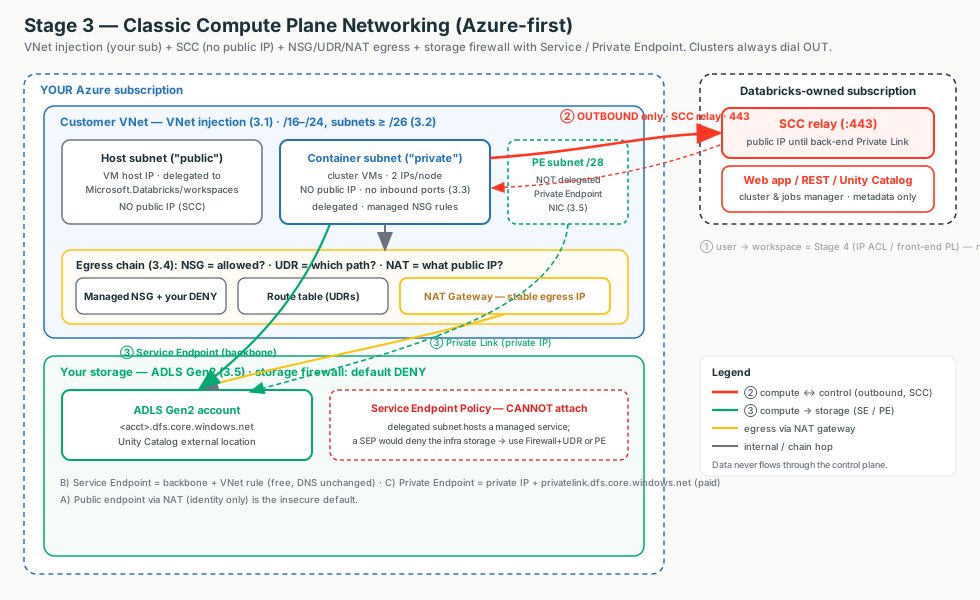
Think of classic compute as a building you lease land for and fit out yourself. Stage 2 said there are only three doors: ① users in, ② compute talks to the control plane, ③ compute reaches your data. Stage 3 is the construction project for the building behind doors ② and ③.
Managed vs Injection
Pick the lot: a locked apartment vs a plot you build on. Permanent.
Subnet Sizing
Pour the foundation: two equal address streets you can never re-pave.
SCC / No Public IP
Wire the intercom: the building always dials out, no inbound door.
NSG
Is this traffic allowed to leave?
UDR
Which road does the traffic take?
NAT
What public IP does it leave from?
Compute → Storage
Corridor to the shop: public, Service Endpoint, or Private Endpoint.
One-way doors
Injection and sizing are permanent - get them right on day one.
Interactive diagrams live in each tab
Each tab below has its own clickable whiteboard: The building → Managed vs Injection, SCC handshake → SCC / No Public IP, Compute → storage → Compute → Storage. Open a tab, then click a box to see what it does in plain English.
The line a security team wants to hear
"Clusters run in your VNet with no public IPs and no open inbound ports - they dial out to the control plane. Egress leaves on a stable NAT IP you can allowlist, and your data stays in your firewalled ADLS Gen2 reached over the Microsoft backbone."
Managed VNet vs VNet Injection: Who Owns the Network?
Start here (plain English)
A VNet is just your own private network in Azure - think of it as a plot of land the cluster VMs sit on. The only question this tab answers is: does Databricks build that plot for you (and lock the gate), or do you build it yourself so you hold the keys?
- Managed VNet - Databricks makes the network for you. Move-in ready, but locked: you can't resize it or change its rules.
- VNet injection - you bring your own network. More setup, but you control the addresses, firewall rules, and routing.
- Subnet delegation - the permission slip you give Databricks to place its machines into your subnets. It's what makes "bring your own network" possible.
Every classic workspace runs its cluster VMs inside an Azure VNet in your subscription. The only question is who owns and configures it.
- Managed VNet: Databricks auto-creates a locked VNet in a managed resource group. Zero config, works out of the box, but you cannot size it, edit its NSGs, or add routes and endpoints.
- VNet injection: you pre-create the VNet and its two subnets, then deploy the workspace into them. Now you own the address space, NSG rules, UDRs, endpoints, and on-prem connectivity. The enterprise baseline.
Interactive: click the boxes
Click each box to see the part of the classic compute plane it represents and who owns it.
| Dimension | Managed VNet | VNet injection |
|---|---|---|
| Who owns it | Databricks, locked, managed RG | You, your subscription |
| CIDR / NSG Deny / UDR | ❌ none selectable | ✅ you control |
| Service/Private Endpoint, back-end PL, on-prem | ❌ | ✅ |
| SCC / No Public IP | ✅ default | ✅ default, recommended |
| Convert later | ❌ not convertible | n/a |
| Use for | POC / demo / training | Any production / regulated |
The choice is irreversible - and gates everything
You can't convert a managed-VNet workspace to injection later (that's a rebuild + migration). NSG egress rules, UDR→firewall, service/private endpoints, back-end Private Link, on-prem routing - all require injection. SCC / No Public IP works in both; injection just adds the customization.
What injection adds under the hood
Injection requires subnet delegation to Microsoft.Databricks/workspaces on both subnets.
Delegation lets Databricks deploy NICs and apply its network intent policy - a service-managed set of NSG
rules it keeps reconciled. You add your own Deny rules; you never edit the managed ones
(they revert).
Customer explanation
"The managed VNet is move-in-ready for a sandbox, but it is locked. For anything facing a security review, inject into a VNet you own so your IPAM, NSG Deny rules, firewall egress, and Private Link are all on the table. The catch is the choice is permanent, so we default production-bound workspaces to injection."
What breaks
"Start managed, inject later" - there is no convert; it's a full rebuild. IaC deploy fails - a subnet isn't delegated. "Our NSG tightening doesn't stick" - someone edited a managed rule; the intent policy reverted it. Add your own Deny rule instead.
Subnet Sizing: How Many Nodes Can This Ever Run?
Start here (plain English)
Every machine on a network needs an IP address - like a house needing a street number. A subnet is a street with a fixed number of house numbers on it. Pick a street that's too short and you run out of numbers, so no more machines can move in. This tab is about picking a street long enough for the most VMs you'll ever run at once - and you can't re-pave it later.
- Subnet - a slice of your network with a set number of IP addresses; bigger slice = more machines.
- Host vs container subnet - each node needs an address on both: one for the VM (host), one for where Spark runs (container). So one node uses two IPs.
- /24 vs /26 - shorthand for size. A
/24is a big street (~251 usable); a/26is a small one (~59). The smaller the number after the slash, the more addresses. - IP exhaustion - running out of free addresses, so clusters can't start or scale up.
A VNet-injected workspace needs two dedicated subnets - container (Portal label "private", where Spark runs) and host (Portal label "public", the VM host). Under SCC both are private despite the labels.
Think of a node as a duplex: it needs a mailbox on both streets, so the streets must be the same length. Each node burns one IP in each subnet, counted across all running clusters at once.
Sizing is a one-way door
"Subnet CIDR ranges cannot be changed after deployment." A too-small subnet caps how many nodes the workspace can ever run. The only fixes - a Public-Preview workspace network migration or an account-team CIDR increase - both involve downtime. Size correctly on day one.
The numbers (Azure reserves 5 IPs per subnet)
| Subnet | Usable IPs (total − 5) | ~Max nodes (all clusters) | Use when |
|---|---|---|---|
/26 (floor) | 59 | ~59 | Dev / small / capped clusters |
/24 | 251 | ~251 | Typical team workspace |
/22 | 1,019 | ~1,019 | Large shared / big jobs |
/20 | 4,091 | ~4,091 | Very large / many concurrent clusters |
Max nodes ≈ 2^(32 − subnet prefix) − 5. Always size the VNet a couple of bits larger than the subnets so a Private Link subnet fits later (Stage 4) without a re-home.
Customer explanation
"Sizing is a one-way door. The subnet CIDR is permanent, so we size for your peak concurrent node count on day one and leave the VNet a couple of bits larger so back-end Private Link fits later without a re-home."
Decision rule
Dev/small → /26; typical team → /24; large/concurrent → /22-/20.
When peak is unknown, size up - IPs are free; a resize is a downtime outage.
SCC / No Public IP: The Cluster Dials Out
Start here (plain English)
Imagine your cluster as a house with no doorbell and no address anyone outside can knock on. Instead of letting Databricks call in to give orders, the cluster phones out first and keeps the line open. Orders come back down that same call. No inbound door means nothing on the internet can attack it.
- No Public IP - the cluster VM has no internet-facing address, so it can't be reached from outside.
- Inbound vs outbound - inbound = someone calling in to your cluster; outbound = your cluster calling out. SCC allows only outbound.
SCC (Secure Cluster Connectivity, a.k.a. No Public IP / NPIP) means your cluster VMs get no public IP and your VNet has no open inbound ports.
Interactive: click the boxes
Click each box to see why there is no inbound door and where egress is managed.
Normally a control plane managing a VM would have to call into it. SCC flips the direction: the cluster places one outbound call to the SCC relay, and the control plane sends all commands back down that already-open connection.
The analogy
The customer-service callback. Instead of the manager knocking on each cluster's front door, the cluster phones the manager first and keeps the line open. You can't knock on a door that doesn't exist.
The senior nuance - "No Public IP" is not "no public addressing anywhere"
SCC removes the public IP from your VM and the inbound port. But the cluster's
outbound call still targets a public IP control-plane endpoint (that's why AzureDatabricks
is in your egress allowlist) - over the Microsoft backbone. Back-end Private Link (Stage 4) makes that last
outbound hop private.
How the control plane runs compute it can never dial into
The confusing part: if nothing can connect in to the cluster, how does the control plane run jobs on it? The trick is that the direction a connection is opened is not the direction commands travel over it.
- At launch the cluster dials out. Each No-Public-IP node opens one outbound TCP 443 connection to the SCC relay - allowed by your NSG/firewall; no inbound rule needed.
- That connection is held open - a persistent reverse tunnel, like a phone line left off the hook.
- Commands flow back down it. When the cluster/jobs manager needs to run a notebook command, launch a Spark stage, autoscale, or terminate, it does not open a new connection - it pushes the instruction down the tunnel the cluster already opened. TCP is bidirectional once established.
- So the cluster is always the client (it initiated), but the control plane drives the work by answering down that channel.
Control path, not data path
Everything above is the management/control path (orchestration, REPL commands, logs) through the relay. Your business data never uses it - bytes move directly between the cluster and ADLS Gen2. The relay carries control, not data.
SCC disabled vs enabled vs + Private Link
| Aspect | Disabled (legacy) | Enabled (default) | + back-end PL |
|---|---|---|---|
| Cluster VM public IP | Yes | No | No |
| Open inbound ports | Yes | No | No |
| Call direction | CP inbound | Cluster outbound | Cluster → private relay |
| CP-side endpoint | Public IP | Public IP | Private IP |
Needs AzureDatabricks egress tag | Yes | Yes | No |
Customer explanation
"SCC flips the call direction. Your cluster phones the control plane outbound, so no public IP and no inbound port. It is the secure default at no cost beyond egress. To make that outbound hop private too, layer on back-end Private Link."
What breaks
Clusters time out on launch - outbound 443 to AzureDatabricks blocked, or no NAT gateway on a new VNet (check
egress, not inbound). Worked then stopped - someone allowlisted the relay by raw IP; switch to the service tag. VM shows a
public IP - SCC didn't apply.
Egress: NSG, UDR, and NAT Gateway
Start here (plain English)
Egress just means traffic leaving your network to reach the outside world. Picture a car leaving a gated estate: a guard checks if it's allowed out, a road sign points it the right way, and it leaves through one main gate so the outside world always sees the same address. Those three jobs are the three tools below.
- NSG - the guard with a guest list: is this traffic allowed to leave?
- UDR - the road sign: which path does the traffic take? (straight to the internet, or via a firewall).
- NAT gateway - the single main gate: gives all outbound traffic one stable public IP others can safely allowlist.
Once the VMs are private, three primitives control the outbound door:
| Control | Question it answers | Analogy | Databricks use |
|---|---|---|---|
| NSG | Is it allowed? | Bouncer with a guest list | Allow/deny at L4 (IP/port/service-tag) |
| UDR | Which path? | Detour sign | Send traffic to Internet, hub, or firewall |
| NAT | What public IP? | Shared mail truck | Stable SNAT egress IP for allowlists |
What a cluster must reach (service tags, never raw IPs)
| Service tag | Port(s) | For |
|---|---|---|
AzureDatabricks | 443 · 3306 · 8443-8451 | SCC relay + web app/REST; legacy metastore; internal CP calls + UC lineage/logging |
Storage | 443 | Artifact + log Blob storage |
EventHub | 9093 | Telemetry / logging |
| (NFS) | 111 · 2049 | Library installs if you tighten egress |
NSGs are L4 only
An NSG filters by IP/port/service-tag - not by FQDN. "Allow only pypi.org" needs Azure Firewall application rules. Databricks auto-manages the baseline NSG rules via delegation - don't edit them; add Deny rules on neighbor subnets.
Scope: only NAT is purely "outbound to the internet"
NAT only source-NATs egress to public destinations — Private Endpoints, Service Endpoints, and on-prem traffic all bypass it. UDR sets the next hop for any egress (internet, Azure services, on-prem, other VNets, private paths), public or private. NSG is bidirectional and also enforces the worker-to-worker rules inside the VNet — so it applies even to traffic that never leaves your network.
So how are Private Endpoint, Service Endpoint, and on-prem traffic handled?
Azure routes every packet by destination, and NAT is only the next hop for the internet default route (0.0.0.0/0). Anything with a more-specific route takes its own private path and keeps a private source IP:
| Destination | How it routes | Next hop | Source IP | NAT? |
|---|---|---|---|---|
| Public internet / SaaS | default route 0.0.0.0/0 | NAT Gateway (or UDR → firewall) | public SNAT IP | Yes |
| Private Endpoint (ADLS, back-end CP) | Private DNS → private IP; Azure injects a /32 route | the PE NIC, intra-VNet → backbone | cluster private IP | No |
| Service Endpoint (e.g. Storage) | subnet injects a service-prefix route | backbone (VirtualNetworkServiceEndpoint) | subnet private IP + VNet rule | No |
| On-prem | on-prem CIDRs via BGP or UDR | VPN Gateway / ExpressRoute (via hub) | private IP | No |
Mental model
NAT is just the gate on the internet road. Private Endpoints, Service Endpoints, and on-prem each have a more-specific route onto the backbone or private circuit, so the router sends them down those roads (private source IP intact) before the 0.0.0.0/0 route ever applies. Precedence: UDR > BGP > system route, longest-prefix-match wins.
Routing precedence - the allowlist gotcha
A 0.0.0.0/0 UDR to a firewall overrides the NAT Gateway (order: UDR-to-NVA » NAT »
instance IP » LB » default route). So the firewall's IP becomes the egress source - allowlist
that, not the NAT IP. Keep the AzureDatabricks/Storage/EventHub service-tag → Internet UDRs so the relay
skips the firewall hop.
Customer explanation
"NSG decides if a packet may leave, UDR decides where it goes, NAT decides what public IP you leave from. Give every injection workspace a NAT for a stable IP, then add NSG denies and a firewall UDR only when the security team mandates outbound allowlisting."
Compute to Storage: Public / Service / Private Endpoint
Start here (plain English)
Your cluster is a computer that needs to read your data, which lives in Azure Storage (ADLS Gen2). To get it, the cluster sends a request across the network to that storage. This whole tab answers one question: which road does the request take, and which door of the storage does it knock on?
First, what is an "endpoint"?
An endpoint is simply an address where something can be reached on the network - think of it as a door into a building. Your storage can be reached through three kinds of door:
Public endpoint
The storage's address on the public internet - the front door on a public street. This is the default. Anyone allowed can reach it over the internet (unless a firewall limits who).
Service endpoint
Not a new address - it's a switch you flip on your subnet that says "send Storage traffic over Microsoft's private backbone, not the open internet," and the storage firewall is told to trust your subnet. Same door, but a staff-only road - and the guard recognises your badge.
Private endpoint
A brand-new private address inside your own network (VNet) for the storage - like adding a private side-entrance on your own campus. Once it exists you can lock the public door entirely.
What is a NIC - and why it matters here?
A NIC (Network Interface Card) is the thing that gives a machine an IP address and plugs it into a network - picture the network socket on a computer. In Azure it's a virtual network adapter.
The link to Private Endpoint
A Private Endpoint is literally a NIC placed inside your VNet that holds the storage's private IP. So "create a private endpoint" really means "drop a network card for the storage account into my network, with a private address." That little NIC is what makes the storage reachable privately.
The same three doors, in more detail
When a cluster reads a Delta table it calls ADLS Gen2 over HTTPS - by default over its public endpoint. A storage firewall slams that public door shut, and you re-open a controlled door two ways:
- Service Endpoint - flip
Microsoft.Storageon your subnet so Storage traffic leaves over the Azure backbone with the subnet's private IP as source, then add a VNet rule on the storage firewall. Free, no DNS change, same-region, no on-prem. - Private Endpoint - drop a NIC with a private IP inside your VNet (in a dedicated
/27-/28subnet, not the delegated ones); the FQDN now resolves to that private IP via a Private DNS Zone (privatelink.dfs.core.windows.net). Then set Public access = Disabled. Paid, needs DNS, but works from on-prem.
Interactive: click the boxes
Click each box to compare the public, Service Endpoint, and Private Endpoint routes.
| Dimension | Public | Service Endpoint | Private Endpoint |
|---|---|---|---|
| Path | NAT → public IP | Backbone, private src IP | Private Link, private IP |
| New private IP / DNS change? | No / No | No / No | Yes / Yes |
| Cost | Egress only | Free | Hourly + per-GB |
| Reaches on-prem? | Yes (public) | No | Yes |
| Public access can be Disabled? | No | No | Yes |
The footgun - Service Endpoint Policies can't attach here
A SEP (allow-list of which storage accounts a subnet may reach) is unsupported on subnets delegated to a managed service - and because a SEP denies anything unlisted, it would block the managed-service infra storage and break the workspace. For exfiltration control use Azure Firewall + UDR FQDN allowlist or a Private Endpoint + Public access Disabled.
Customer explanation
"With a Service Endpoint, cluster-to-storage stays on the Microsoft backbone with a private source IP, for free, no DNS change. With a Private Endpoint, it is private end-to-end, reachable from on-prem, and we can set Public access = Disabled - but it costs per-account and needs a DNS override."
Networking vs identity
Networking decides where a packet may go; Unity Catalog + an Access Connector managed identity decides who may read. This tab is the networking half.
Field Notes: How To Think During Troubleshooting
Don't start with ports or CIDR math. Start by asking what is happening to the packet and which decision was a one-way door.
| Symptom | First Thing To Think |
|---|---|
| Clusters stuck Pending on a fresh VNet | Is a NAT Gateway on both subnets? (post-2026-03-31 no implicit outbound) |
| IaC deploy fails on the subnets | Are both subnets delegated to Microsoft.Databricks/workspaces? |
| Cluster won't start / autoscale stalls (no IPs) | Free IPs on both subnets vs peak nodes x 2? |
| Cluster cannot reach control plane | Is outbound 443 to the AzureDatabricks tag allowed? |
| UC lineage / logging fails after hardening | Was the managed 8443-8451 rule deleted or shadowed? |
| Partner allowlist rejects despite a NAT | Does a 0.0.0.0/0 UDR to a firewall override the NAT? |
| "PE created but storage reads still fail" | Does the FQDN resolve to a private IP (Private DNS zone)? |
| SEP attach broke the workspace | SEPs are unsupported on delegated Databricks subnets |
| "Can we change managed to injection later?" | No - it is a rebuild + migration |
The seven questions
- Who owns the VNet - did we inject, or accept the managed (locked) one?
- Are the subnets sized for peak concurrent nodes, with VNet headroom for a PL subnet?
- Is SCC on, so clusters have no public IP and no inbound port?
- Is egress allowed (NSG), routed correctly (UDR), and stable (NAT)?
- How does compute reach storage - public, Service Endpoint, or Private Endpoint?
- Is there a regulatory mandate for no public-IP hop, or is backbone-private enough?
- Which of these decisions is a one-way door we must get right today?