Private Link, DNS & Topologies, Without the Memorizing
The One Mental Model
Think of your Databricks workspace like an office building you already own. It has three doors and is already reachable over the Microsoft backbone - but it still has a public phone number anyone can dial. Private Link is a retrofit of that building, not a new one.
Front-end PE
The line users dial in on (UI / BI / REST).
Back-end PE
The line the cluster room dials out on (to control plane).
Web-auth PE
The receptionist's line that confirms SSO callers. One per region.
Private DNS
The directory edit that reroutes the public number to the private line.
Transit hub VNet
One guarded lobby - front door, DNS, firewall - reused by every spoke.
Workspace spoke
The floor each workspace is injected into; holds the back-end PE.
Azure Firewall (DEP)
The customs officer on the single exit, with an FQDN guest list.
Public Network Access
The master switch you set to Disabled once all three paths are private.
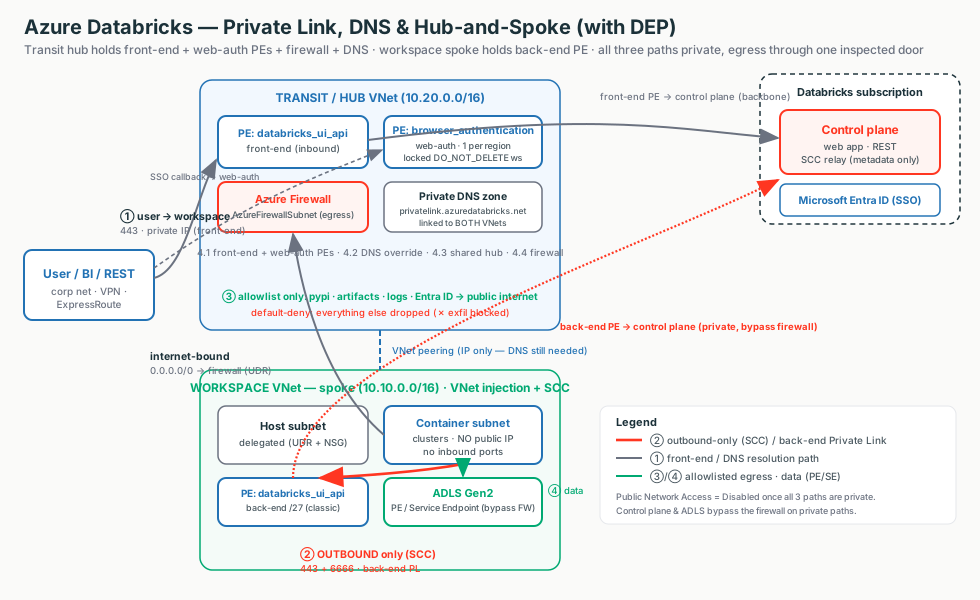
Interactive diagrams live in each tab
Each tab below has its own clickable whiteboard: Three private extensions → Connection Types, Private DNS path → Private DNS, Exfiltration protection → Exfiltration Protection. Open a tab, then click a box to see what it does in plain English.
What matters for Databricks
Stage 2 traffic is already backbone-private. Private Link removes the public-IP hop on each path; DNS decides whether anyone lands on the private IP; hub-and-spoke decides where the endpoints live; and DEP forces leftover internet egress through one inspected, default-deny door. Flip Public Network Access = Disabled once all three paths are private.
Private Link Connection Types: Three Private Extensions
Start here (plain English)
Your workspace can normally be reached over the public internet. Private Link gives it a private address inside your own network instead - like adding a private side-entrance into a building you already own, so traffic never has to step out onto the public street. There are three of these side-entrances, one for each kind of traffic: users coming in, clusters dialing out, and the login check.
- Private Endpoint (PE) - a network card with a private IP, dropped into your network, that stands in for a service. It is the actual side-entrance.
- Front-end Private Link - makes the path users/BI take into the workspace private.
- Back-end Private Link - makes the path clusters take out to the control plane private.
- Web-auth Private Link - makes the SSO login callback private. One per region.
- "Private extension of a service" - the service stays where it is; you just add a private door into your network that reaches it.
Simple version: Private Link lets a normally-public service be reached over a private IP inside your VNet. The concrete artefact is a Private Endpoint (PE) - a NIC with a private IP that maps to a target service.
Azure Databricks has three connection types, one per path:
- Back-end (classic): clusters in your VNet -> the control plane (SCC relay + REST).
- Front-end (inbound): users / BI / REST -> the workspace UI and API.
- Web-auth (browser authentication): the SSO/OAuth callback from Microsoft Entra ID. One per region.
Interactive: click the boxes
Click each box to see which path it privatizes and why.
| Back-end (classic) | Front-end (inbound) | Web-auth | |
|---|---|---|---|
| Secures | Cluster -> control plane (SCC + REST) | User/BI/REST -> workspace | SSO/OAuth login callback |
groupId | databricks_ui_api | databricks_ui_api | browser_authentication |
| Lives in | Workspace VNet | Transit VNet | Transit VNet (web-auth ws) |
| How many | 1 per workspace VNet | 1 per transit VNet | 1 per region / DNS zone |
| NSG mode | NoAzureDatabricksRules | AllRules (hybrid) | NoAzureDatabricksRules |
Two facts to anchor on
Only two groupIds exist: databricks_ui_api (used by both front-end and back-end - the VNet you place it in decides the role) and browser_authentication (SSO only). And Private Link does not replace SCC - it removes the last public hop SCC left behind.
Customer explanation
"Your workspace ships with a public phone number. Private Link gives it unlisted internal extensions - one for users dialing in, one for clusters dialing out, and one for the SSO check. The public number stays printed until we flip Public Network Access to Disabled; then only the private lines work."
What breaks
- Forget web-auth -> REST works but browser login spins/fails region-wide (the #1 Private Link outage).
- Wrong NSG mode -> cluster connectivity drops.
- Delete the web-auth host workspace -> every workspace in the region loses browser login.
Private DNS: The Switch That Makes Anyone Use the Private IP
Start here (plain English)
Building the private side-entrance isn't enough if everyone keeps walking to the public front door out of habit. DNS is the phone book that turns a name into an address - so to actually use the private door, you have to edit the phone book so the same workspace name points at the new private address.
- Name → IP - DNS is the lookup that turns a readable name (the workspace URL) into the numeric address the computer connects to.
- Public DNS - the phone book everyone shares; by default it returns the workspace's public IP.
- Private DNS Zone - a private phone book linked to your network that overrides that answer with the private IP of your endpoint.
- Why a PE also needs a DNS override - the endpoint just creates the private address; without the phone-book edit, nobody is told to use it and traffic still goes out the public door.
DNS turns a name into an IP. By default the workspace name resolves to a public control-plane IP. Once you create a Private Endpoint, you must override DNS so the same name resolves to the private IP - otherwise traffic keeps going out the public door.
The override is a chain: the public zone hands out a CNAME to ….privatelink.azuredatabricks.net; your private zone holds the A record to the private IP. The zone name is fixed: privatelink.azuredatabricks.net.
Interactive: click the boxes
Click the boxes to see why a Private Endpoint also needs a DNS override.
| Sub-resource | A-record name | Points to |
|---|---|---|
databricks_ui_api | adb-<id>.<n> (host label only) | Private IP of the workspace/back-end PE |
browser_authentication | <region>.pl-auth (e.g. westus.pl-auth) | Private IP of the web-auth PE |
Important idea
Private Link gives you the private IP; DNS is the switch that decides whether anyone lands on it. If a Private Link deployment "doesn't work," suspect the directory (DNS) before the phone line (the endpoint).
Customer explanation
"From a VM inside the VNet, nslookup of the workspace URL must return the private IP, with the public name shown as an alias. If you run your own DNS, you conditional-forward *.azuredatabricks.net, *.privatelink.azuredatabricks.net, and *.databricksapps.com to Azure's resolver 168.63.129.16."
What breaks
- PE created but zone not linked / no record -> clients resolve the public IP ->
Control Plane Request Failure. - Workspace record present,
pl-authforgotten -> workspace loads, then the SSO callback fails. - Full FQDN in the A-record name -> no resolution. The name is just the host label; the zone supplies the suffix.
Transit / Hub-and-Spoke: Build the Private Front Door Once
Start here (plain English)
Picture an office tower with one guarded lobby. Everyone enters through that lobby - where security, the directory, and the switchboard live - and each team's floor wires back to it, never directly to each other. You build the shared front door, DNS, and firewall once in that lobby, then connect every workspace to it instead of rebuilding it floor by floor.
- VNet - one isolated network in Azure (one floor or lobby of the tower).
- Hub VNet - the central, shared lobby that holds services everyone reuses (firewall, DNS, the inbound private endpoints).
- Spoke VNet - a workspace's own floor; it connects back to the hub, not to other spokes.
- VNet peering - the hallway wiring a spoke to the hub so they can reach each other privately.
- Why central shared services - build the expensive private door, DNS, and egress firewall once and reuse them fleet-wide, instead of duplicating them per workspace.
A hub-and-spoke network is a central hub VNet that every spoke peers to. Spokes route through the hub, where shared services live (firewall, DNS, gateways, shared private endpoints).
- The transit VNet is the hub all user/client traffic enters through. It holds the front-end and web-auth PEs.
- The workspace VNet is the spoke each workspace is injected into. It holds the back-end PE.
| Dimension | Standard (dedicated transit VNet) | Simplified (combined PE host) |
|---|---|---|
browser_authentication PE | Dedicated locked web-auth workspace | On an existing workspace |
| Blast radius of deleting the host | Low - web-auth ws does nothing else | High - breaks SSO region-wide |
| Infra & cost | More (extra VNet + workspace) | Fewer resources |
| Recommended for | Production, multi-ws, regulated | Non-prod, single-ws-per-region, PoC |
Common gotcha
VNet peering gives IP reachability only - not DNS. Peering is a hallway, not the directory. You still must link the privatelink.azuredatabricks.net zone to both VNets (or conditional-forward), or clusters and users resolve the public IP and Private Link silently does nothing.
Customer explanation
"The transit hub is the guarded lobby of an office tower - everyone enters through one reception desk where security, the directory, and the switchboard live. Each team's floor wires back to the lobby, never to each other. We build the private front door, DNS, and egress firewall once, then peer every workspace spoke to it."
Quick sizing note
Transit PE subnet /26-/25; web-auth workspace host+container /28 or /27 each; classic back-end PE subnet /27. Stop all compute before NSG / Private Link changes on an existing workspace (15+ minutes).
Data Exfiltration Protection (DEP): One Inspected Exit
Start here (plain English)
Think of an airport with exactly one exit and a customs officer. People move freely inside the terminal, but the only way out to the street is past the officer, who checks a short printed guest list and turns away anyone not on it. DEP does the same for your clusters: there is one inspected way out to the internet, and only a few approved destinations are allowed - so a compromised notebook can't quietly ship your data off to a random site.
- Data exfiltration - data leaving to somewhere it shouldn't, e.g. a hacked notebook uploading your tables to an outside server.
- FQDN allowlist - the guest list of approved destinations by name (like
pypi.org); everything not on it is blocked. - Single inspected chokepoint - one door (an Azure Firewall) that every outbound request must pass through and be checked at, instead of many uncontrolled exits.
DEP is the architecture pattern that makes data exfiltration almost impossible: put compute in a locked-down VNet, force every outbound packet through a single inspected chokepoint (an Azure Firewall in a central hub), and only allow a short, explicit FQDN allowlist out.
DEP is not one switch - it is the combination of VNet injection + SCC + back-end Private Link + a UDR (0.0.0.0/0 -> firewall) + an FQDN allowlist.
Interactive: click the boxes
Click the boxes - two paths bypass the firewall by design.
| Flow | Path | Touches the firewall? |
|---|---|---|
| Control plane + SCC | Back-end Private Link (private IP) | No - bypasses by design |
Internet-bound 0.0.0.0/0 | UDR -> Azure Firewall -> allowlist only | Yes |
| ADLS / your storage | Private Endpoint or Service Endpoint | No - per-GB would be ruinous |
| Everything else | Firewall default-deny | Yes - dropped |
Two paths bypass the firewall by design
With back-end Private Link on, the docs say the AzureDatabricks service tag isn't required in the UDR - the control plane/SCC drop off the firewall entirely. ADLS uses a Private/Service Endpoint. So you pay to inspect a trickle of genuine internet egress, not your data. Always allowlist by FQDN / service tag, not raw IP (Azure rotates IPs); allowlist the SCC relay as tunnel.<region>.azuredatabricks.net.
Customer explanation
"DEP is an airport with one exit and a customs officer. People move freely inside the terminal, but the only way out to the street is past the officer, who checks a printed guest list - pypi, the artifact store, Entra ID - and turns away anyone not on it. Your control plane and data use private tunnels that never touch that public door."
Why it breaks - sequence matters
Attach the 0.0.0.0/0 -> firewall UDR before allowlisting / Private Link -> clusters can't reach the relay/artifacts and won't launch. Route SCC through the firewall -> latency + per-GB cost + fragile rules. Route table on only one subnet -> the un-routed subnet's egress escapes the firewall. Assume DEP covers serverless -> it doesn't (that's NCC + network policies, Stage 5).
Field Notes: How To Think During Troubleshooting
Don't start by memorizing ports or FQDNs. Start by asking: is the path private, does DNS point at it, and where does egress go?
| Symptom | First Thing To Think |
|---|---|
| Browser login spins/fails but REST works | Is web-auth missing, or does <region>.pl-auth not resolve to the private IP? |
Cluster start fails Control Plane Request Failure | Is the zone linked to the workspace VNet, and does the URL resolve privately from a cluster subnet? |
| Connectivity drops after enabling back-end | Wrong NSG mode - NoAzureDatabricksRules for back-end? |
| Region-wide login outage | Was the web-auth host workspace deleted? Does WEB_AUTH_DO_NOT_DELETE_<region> still have a Delete lock? |
| Clusters won't launch after the UDR goes on | UDR attached before allowlist/Private Link? Check firewall deny logs. |
| Egress "leaks" past the firewall | Is the route table on both host and container subnets? |
| "Does this protect our serverless?" | No - serverless egress is NCC + network policies, not DEP. |
The eight questions
- Is each of the three paths on a private IP yet (front-end, back-end, web-auth)?
- Does DNS resolve the name to that private IP - including the
pl-authSSO name? - Did we link the private DNS zone to every VNet that must resolve privately?
- Are endpoints placed correctly - front-end/web-auth in the transit hub, back-end in the spoke?
- Is the web-auth workspace locked so an accidental delete can't take down a region?
- Does internet egress pass one inspected firewall with an FQDN allowlist?
- Do the control plane and storage bypass that firewall on private paths?
- Is this classic compute (DEP applies) or serverless (NCC + network policies)?