Serverless Networking
AzureDatabricksServerless tag / an NCC private
endpoint) and deny-by-default egress — never by chasing an IP.Serverless: a compute plane you don't own
With classic compute the VMs live in your VNet, so you secure them by recognising their source IP/subnet. With serverless the VMs run in the Databricks account on a dynamic IP pool you can't peer to or allowlist. So you secure path ③ by service identity and a deny-by-default egress policy — and path ② (compute↔control) is already private (backbone + TLS) and not yours to configure.
🧠 Mental model — hold this in your head
Serverless compute is a ride-share, not a car you own. You never own the licence plate
(the source IP), so you can't allowlist it. You secure it by trusting the service (the
AzureDatabricksServerless tag / an NCC private endpoint) and by controlling where it's
allowed to drive (a deny-by-default network policy). The construct exists because the IP doesn't.
The four subtopics on one map
| Subtopic | The one question it answers | Construct |
|---|---|---|
| 5.1 Architecture | Why doesn't the classic toolkit apply? | Compute is Databricks', not yours — dynamic IPs |
| 5.2 NCC | How does serverless reach my resources privately? | Service tag (backbone) / private endpoints |
| 5.3 Egress control | Whether an outbound call is allowed at all | Account-level network policy (deny-by-default) |
| 5.4 Storage patterns | How do I lock the ADLS firewall without breaking it? | Public / service tag (NSP) / private endpoint + managed identity |
The two-must-say-yes rule
For serverless to reach storage, NCC answers "can I reach it privately?" and the network policy answers "am I allowed to reach it at all?" — both must say yes. And reachability itself is two locks: network (firewall trusts serverless) AND auth (managed identity + UC grant). "Classic works, serverless doesn't" is almost always the network lock, not the grant.
Static topology (zoom-crisp, reusable in slides)
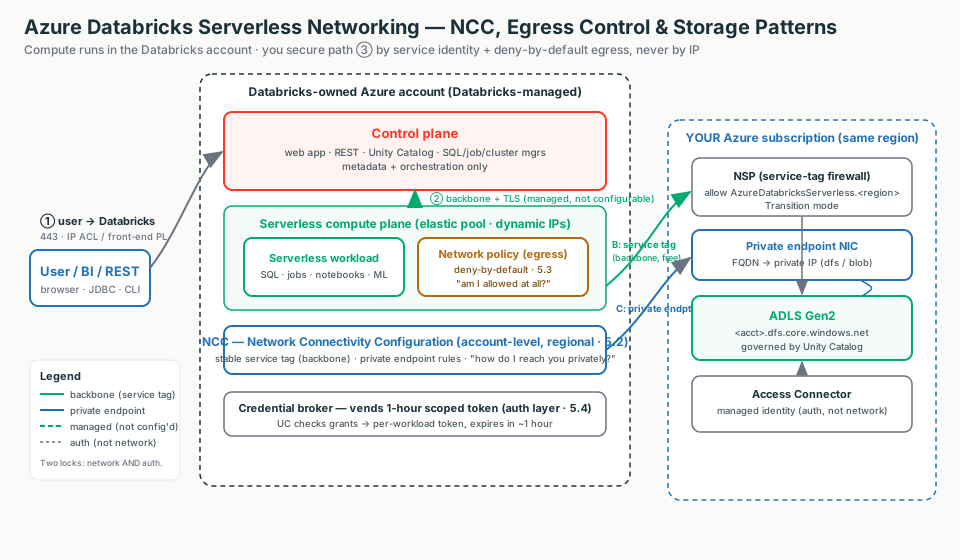
Terms used here (full deep-dive lives in-page or earlier)
- NCC
- Account-level, regional object: serverless private/firewalled connectivity to your resources. → 5.2
- Network policy
- Account-level deny-by-default outbound control for serverless (Full vs Restricted). → 5.3
- Service tag
AzureDatabricksServerless.<region>— auto-updating named IP set you allowlist instead of raw IPs. → 5.4- NSP
- Azure Network Security Perimeter — wraps a storage account so you can write service-tag inbound rules. → 5.4
- group_id
- PE subresource:
dfs= ADLS data path,blob= blob (model-serving artifacts). → 5.2 - Access Connector
- First-party Azure resource holding the managed identity UC uses to auth to storage (not network). → 5.4
5.1 · Serverless architecture & why networking differs
Same control plane; the difference is where the compute lives. Switch the diagram between classic (your VNet) and serverless (Databricks' account) and click any box to see what it is and why the classic controls do — or don't — apply.
Why "no fixed IP" kills the classic toolkit
Serverless compute is a shared, elastic pool with rotating IPs. You can't VNet-peer to it
(nothing of yours to peer to) and can't allowlist a static IP (the egress IP is one of a
dynamic pool). So "let only Databricks serverless reach my ADLS" is answered with a construct that tracks the
moving pool — the AzureDatabricksServerless service tag or an NCC private endpoint.
Classic vs serverless
| Dimension | Classic | Serverless |
|---|---|---|
| Where it runs | Your subscription / VNet | Databricks account |
| Compute source IP | Yours (subnet + stable NAT) | Databricks' dynamic pool |
| CP ↔ compute | SCC relay (can add back-end PL) | Always backbone + TLS, not configurable |
| Outbound control | NSG / UDR / your Azure Firewall | Network policies (deny-by-default) |
| IP exhaustion risk | Real (you size CIDR) | None |
| Tier | Standard+ (PL needs Premium) | Premium |
Illustrative config — the constructs that replace the classic toolkit
There is nothing to provision for the serverless plane itself. Full builds are 5.2 (NCC) and 5.3 (egress policy).
resource "databricks_mws_network_connectivity_config" "this" {
  name   = "ncc-eastus2-prod"
  region = "eastus2"          # MUST equal the workspace region (serverless plane is co-regional)
}
resource "databricks_mws_ncc_binding" "this" {
  network_connectivity_config_id = databricks_mws_network_connectivity_config.this.id
  workspace_id                   = var.workspace_id   # bind so this workspace's serverless uses it
}
Account Console: Settings → Feature enablement → enable Serverless compute (Premium). Create a SQL Warehouse → Type = Serverless — no VNet/subnet/CIDR is ever requested.
Not a setting
The control-plane ↔ serverless path is not configurable. If asked "how do I privatize that hop," the answer is "Databricks already does — backbone + TLS, by design." Don't go hunting for a toggle.
5.2 · Network Connectivity Configuration (NCC)
An account-level, regional object bound to workspaces — the single control point for how serverless reaches your private resources. Switch the diagram between the service-tag (backbone) model and the private-endpoint model; click any box for the "what + why."
Path ② is fully managed — NCC is only path ③
Compute ↔ control plane is always backbone + TLS, managed by Databricks — no SCC relay to set up, no back-end Private Link to wire. NCC governs only path ③ (serverless → your resources).
Service tag vs private endpoint
| Option | Cost | When to use | When NOT to |
|---|---|---|---|
| Service tag / NSP | Free of data-proc charge | Default for most; firewalled storage without per-IP toil | When a private IP is contractually mandated |
| NCC private endpoint | Per-hour, per-rule (Azure) | Regulator/no-public-path mandate; Azure SQL / Key Vault | When the cheaper service tag already satisfies it |
Illustrative config — NCC + private endpoint + binding
resource "databricks_mws_network_connectivity_config" "this" {
  name   = "ncc-eastus-bu1"
  region = "eastus"                       # regional object; workspaces must match this region
}
resource "databricks_mws_ncc_private_endpoint_rule" "adls_dfs" {
  network_connectivity_config_id = databricks_mws_network_connectivity_config.this.id
  resource_id                    = azurerm_storage_account.data.id
  group_id                       = "dfs"  # "blob" for blob-path access (e.g. model-serving artifacts)
}
resource "databricks_mws_ncc_binding" "bind" {
  network_connectivity_config_id = databricks_mws_network_connectivity_config.this.id
  workspace_id                   = var.workspace_id   # ≤ 50 workspaces per NCC, same region
}
Account Console: Security → Network connectivity configurations → Add → bind to workspace
(wait ~10 min + restart serverless). Private endpoint rule → status PENDING → approve on the
storage account (Networking → Private endpoint connections) → refresh until ESTABLISHED.
Limits (verify before quoting)
≤ 10 NCCs/region, ≤ 100 private endpoints/region, ≤ 50 workspaces/NCC;
NCC and workspace must be co-regional. PE rules are billed per hour regardless of
connection state. A rule stuck PENDING expires after 14 days.
5.3 · Serverless egress control / network policies
The deny-by-default egress firewall for the serverless plane. Switch the diagram between Full access (open, with optional block-list) and Restricted access (deny-by-default); click a box to see what is allowed, what is denied, and why.
The exfil-critical rule — no direct storage from UDF/REPL
In restricted mode, direct storage access from user code (UDFs, REPLs, notebook Python) is denied by
default. Reads must go through Unity Catalog securables (allowed automatically) or DBFS
mounts at a listed account — so every access is governed and audited. The escape hatch is the exact
storage FQDN, never *.dfs.core.windows.net.
Both must say yes — even over a private endpoint
The policy applies even to traffic over an NCC private endpoint. NCC = "can I reach it privately?"; network policy = "am I allowed to reach it at all?" Both must say yes. And after changing access/dry-run mode you must restart serverless compute.
Illustrative config — deny-by-default + audit
resource "databricks_account_network_policy" "restricted" {
  network_policy_id = "serverless-restricted"
  egress = {
    network_access = {
      restriction_mode = "RESTRICTED_ACCESS"   # deny-by-default; FULL_ACCESS = open
      allowed_internet_destinations = [
        { destination = "partner-api.example.com", internet_destination_type = "DNS_NAME" }
      ]                                          # max 100 FQDNs; 2,500 total destinations
      allowed_storage_destinations = [
        { azure_storage_account = "mydatalake", azure_storage_service = "dfs" }
      ]
    }
  }
}
-- Audit what got denied (or would have, in dry-run):
SELECT event_time, workspace_id, access_type, network_source_type, destination
FROM system.access.outbound_network
WHERE event_time >= CURRENT_TIMESTAMP() - INTERVAL 2 HOUR
ORDER BY event_time DESC;
-- access_type = 'DROP' = blocked; 'DRY_RUN_DENIAL' = would have been blocked.Account Console: Security → Networking → Context-based ingress & egress control → Egress → Restricted access → add Allowed domains / storage → (optional) dry-run → assign to workspace. Account-level APIs need an OAuth token (PATs rejected). Block internet destinations is REST-API-only and in Public Preview.
5.4 · Serverless storage access patterns
Three ways to a firewalled ADLS Gen2, least → most locked-down — plus the separate auth layer. Switch the diagram between the three patterns; click any box for the "what + why." Remember: two locks — network reachability AND authorization.
Two locks, two keys
The network pattern only opens the front door (reachability). The managed identity + 1-hour scoped token is the keycard (authorization — what the identity may touch). A service principal cannot reach firewalled storage; the Access Connector's managed identity is trusted as a resource instance.
The three patterns side by side
| A · Public | B · Service tag (NSP) | C · Private endpoint (NCC) | |
|---|---|---|---|
| Path | Public IP | Azure backbone | Private IP (FQDN→PE) |
| Networking cost | Lowest | Low (no data-proc charge) | Highest (per-hr per-rule + per-GB) |
| Plan | Any | Any | Premium |
| When | Dev / PoC | Default for prod | Private-link mandate only |
Illustrative config — service tag (NSP) + the auth layer
// Bicep — allow serverless (service tag) into a firewalled ADLS Gen2 via NSP.
resource inbound 'Microsoft.Network/networkSecurityPerimeters/profiles/accessRules@2023-08-01-preview' = {
  name: '${nspName}/${profileName}/allow-databricks-serverless'
  properties: {
    direction: 'Inbound'
    addressPrefixes: []
    serviceTags: [ 'AzureDatabricksServerless.${region}' ]   // regional tag limits exposure
  }
}
-- Authorization (all three patterns): wrap the managed identity, govern with UC grants.
CREATE STORAGE CREDENTIAL adls_cred
WITH AZURE_MANAGED_IDENTITY ( ACCESS_CONNECTOR_ID = '/subscriptions/.../accessConnectors/adb-connector' );
CREATE EXTERNAL LOCATION data_lake
URL 'abfss://raw@myadls.dfs.core.windows.net/' WITH (STORAGE CREDENTIAL adls_cred);
GRANT READ FILES ON EXTERNAL LOCATION data_lake TO `data-eng`;Stay in Transition mode
Associate the storage account to the NSP in Transition mode (NSP rules first, fall back to the
storage firewall on no-match). Enforced bypasses the firewall for every service —
breaking anything not also onboarded to the NSP. Model serving needs both blob
and dfs private-endpoint subresources.
Decision guide — what an architect recommends
Serverless + service tag (NSP)
- Premium customer wants speed/elasticity, no VNet ops
- Firewalled ADLS, "no public internet," no PL mandate
- Backbone-private, free of data-processing charges
- Auto-updating tag — no IPs to hand-manage
NCC private endpoint + restricted policy
- Regulated profile mandates Private Link / forbids service tags
- Need deny-by-default exfiltration control on serverless
- Reproduces the classic DEP posture without a customer VNet
- Accept per-hour per-rule cost + scale ceilings; Premium
Don't reach for private endpoints when…
- A free service tag on the backbone already meets the bar
- There is no "no public path" / Private Link mandate
- You just want to block a few known-bad domains (use the block-list)
Don't…
- Try to peer to serverless or allowlist a single egress IP
- Hard-code serverless IPs / subnet IDs (steer to NSP + service tag)
- Enforce a restricted policy without a dry-run first
- Forget the compute restart after an NCC/policy change
- Sign off on Pattern A (public) for production
Rule of thumb
Start free, step up only when mandated. Service tag via NSP (Pattern B) and a restricted policy cost little and are backbone-private. Add NCC private endpoints only when a regulator demands no public path or on-prem-style routing. Stay on classic + VNet injection (+ DEP) when a regulator requires all compute in the customer's subscription or a firewall box in the data path. All of this is Premium.
Customer Q&A — what the security team actually asks
Common asks & the answer
| Customer asks… | Architect answers… |
|---|---|
| "Does my data cross the public internet between your control plane and serverless?" | No — the CP↔serverless hop is always backbone + TLS, by design, not configurable. |
| "Give me the stable egress IP and I'll allowlist it." | There is no static IP. Use the regional AzureDatabricksServerless.<region> service tag on an NSP, or an NCC private endpoint. |
| "How is our compute isolated from other customers?" | Per-workspace boundary + inter-cluster controls + ephemeral 1-hour scoped credentials; no privileges outside scope. |
| "Can we put our own Azure Firewall in the serverless egress path?" | No — you get policy-based deny-by-default egress control, not a firewall box you operate. |
| "What stops a UDF from POSTing our data out?" | A restricted network policy (deny-by-default) + forcing data access through Unity Catalog. |
| "Why a managed identity, not a service principal?" | A service principal cannot reach firewalled storage; the Access Connector's managed identity is trusted as a resource instance. |
What breaks in the field — and the FIRST check
"Classic reads firewalled ADLS, serverless can't"
The firewall wasn't told to trust serverless.First check the network lock, not the grant: NSP inbound rule for AzureDatabricksServerless.<region> (or an ESTABLISHED PE).
NCC private endpoint never connects
Nobody approved it on the storage side.First check the PE connection state: a rule stuck PENDING needs approval (EXPIRED after 14 days).
Rules applied but serverless still fails
Already-running compute kept the old posture.First check whether serverless compute was restarted (~10 min + restart).
NCC missing from the workspace dropdown
Region mismatch.First check the NCC region vs the workspace region — must be co-regional.
Jobs fail outbound after enforcement
A destination isn't allowlisted.First check system.access.outbound_network for access_type='DROP' — it names the exact FQDN/storage.
Model serving can't log models
A dfs-only PE silently breaks artifact access.First check the PE group_id — serving needs both blob and dfs.
Three questions to ask before recommending an architecture
- Is there a regulatory mandate for Private Link / no public path, or is backbone-private (service tag) enough?
- Do you need deny-by-default exfiltration control on serverless — and are you ready to dry-run it first?
- Are you on Premium, and are workspace, serverless plane, and storage all co-regional?