Who Gets In, How They Prove It, and From Where
The One Mental Model
Think of an Azure Databricks workspace like a secured office building.
Microsoft Entra ID
The central security desk - the single keymaker that issues badges.
SSO
Log in once at the desk; the badge opens many doors.
SCIM / Auto identity mgmt
The HR feed that adds and removes badge-holders automatically.
Service principal
A robot's badge - lets automation in without a human.
Token
A day-pass a tool carries. PAT never expires; OAuth expires hourly.
Conditional Access
The badge reader: right badge, managed device, trusted location.
IP access lists
The bouncer reading the return address on every envelope.
Front-end Private Link
A private tunnel that removes the public door entirely.
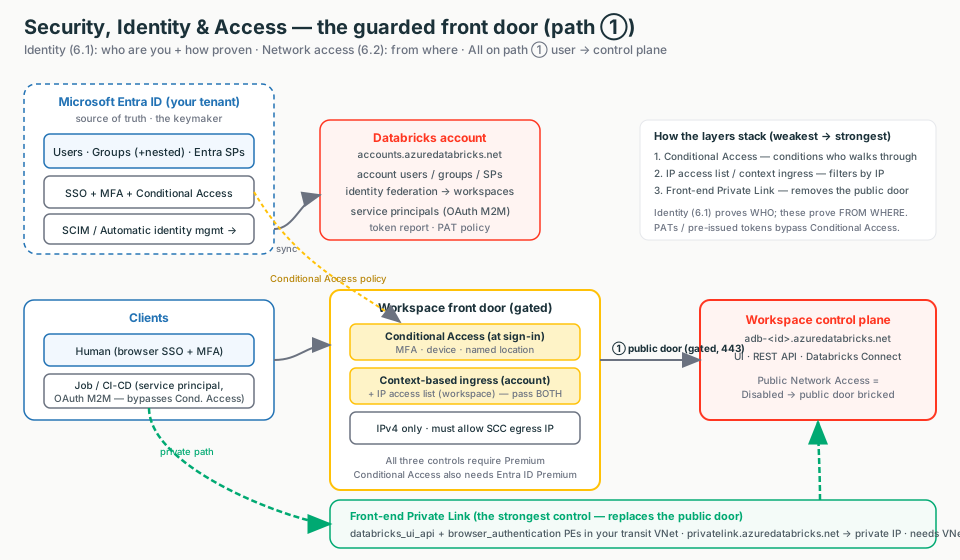
Interactive diagrams live in each tab
Each tab below has its own clickable whiteboard: Identity flow → Identity & SSO, Front-door controls → IP Access Lists, Private Link path → Front-end Private Link. Open a tab, then click a box to see what it does in plain English.
Where this sits
Networking (Topics 1-4) decided which paths can reach the workspace. This topic decides who is on the path, how they prove it, and from where. What they may then do (Unity Catalog grants) is the next topic.
The one sentence to remember
"Define an identity once in Entra ID, prove it via SSO (humans) or short-lived OAuth (robots), then gate the door by where the request comes from."
Identity & SSO: Who Are You?
Start here (plain English)
Before anyone can use the workspace, the system has to know who they are and let them in with one company login - the same way a security desk checks your ID and hands you a badge that opens many doors. This tab is about that front-desk check: who you are, and how you prove it.
Authentication
Proving who you are (logging in). "Who are you, and prove it."
Authorization
A separate step: what you're allowed to do once you're in (next topic).
SSO (Single Sign-On)
Log in once with your corporate account; that one login opens many apps.
Microsoft Entra ID
Microsoft's cloud login service - the security desk. (Old name: "Azure AD".)
SAML
The common language apps use to hand a login off to a trusted identity provider.
Authentication is proving who you are (login). It is different from authorization, which is what you can do (next topic).
On Azure, the security desk is Microsoft Entra ID (the old name was "Azure AD / AAD" - do not say that to a customer). Azure Databricks logs in against it by default; there is nothing to turn on for the Microsoft IdP.
How each party proves identity
- Humans log in with Entra ID SSO - one corporate login, no separate Databricks password.
- Automation logs in as a service principal using OAuth M2M.
- Identities are defined once in the account, then assigned to workspaces - that is identity federation.
Interactive: click the boxes
Follow an identity from Entra ID through the account to a workspace login.
Multi-IdP note
The first-party IdP is always Microsoft Entra ID. Want to use Okta or Ping? Federate that IdP into Entra ID - Entra ID stays the IdP Databricks talks to.
Customer talk-track
"Identity is the front door. We make Microsoft Entra ID the single source of truth, run every production job as a service principal on short-lived OAuth, and cap or kill long-lived tokens - so off-boarding someone in your IdP is the only lever you need."
What breaks
- User logs in but has no access -> workspace non-federated, or the group is a workspace-local group (not an account group), so it can't get grants.
- Job fails to authenticate (401/403) -> ran as a named human who got off-boarded, or a PAT expired.
Provisioning: How People Get Added and Removed
Start here (plain English)
Provisioning means creating users and groups automatically instead of by hand - like an HR feed that adds a badge the day someone joins and pulls it the day they leave. You manage people in one place (your company directory), and Databricks just keeps in step.
- SCIM - the standard "plumbing" that pushes users and groups from your directory into another app.
- Account vs workspace identity - define a person once at the account level, then assign them to one or more workspaces (define once, use many).
You do not add users by hand. You wire your IdP to do it - two ways:
| Question | Automatic identity management | SCIM (legacy) |
|---|---|---|
| Sync users + groups? | Yes | Yes (direct members only) |
| Sync nested groups? | Yes | No |
| Sync service principals? | Yes | No |
| Needs an Entra app / admin role? | No | Yes |
| On by default? | Yes (accounts after 2025-08-01) | No |
Off-boarding is a security event you do once
Deactivate in the IdP and access propagates to Databricks automatically. The honest caveat: existing PATs are NOT auto-revoked on deactivation - revoke them explicitly.
Common gotcha
Don't provision the same identity via both SCIM and automatic identity management - it creates duplicates and permission conflicts. Pick one source. Cross-tenant Entra ID is single-tenant-only for automatic identity management; use SCIM + Entra B2B to span tenants.
Customer talk-track
"When someone leaves, does access really disappear? Yes - if Entra ID is your source of truth via automatic identity management. The one caveat is existing personal access tokens; those we revoke explicitly."
Service Principals: Robots Should Not Be People
Start here (plain English)
A service principal is a login for an app or robot, not a person - so your scheduled jobs and pipelines sign in as themselves instead of borrowing someone's account. Think of it as a staff badge issued to a machine, so the work keeps running even after a person leaves.
- Service principal - a non-human identity for automation (jobs, pipelines, CI/CD).
- OAuth - the standard way an app proves it is that service principal and gets a short-lived key to call APIs.
A service principal is a non-human robot user for jobs, pipelines, and CI/CD, so automation never runs as a named person.
| Type | Auth | Use it for |
|---|---|---|
| Databricks-managed SP | OAuth M2M (client ID + secret) | Databricks-only automation - recommended |
| Entra ID SP | Entra ID token | Azure resources that only speak Entra ID (e.g. Azure DevOps) |
Run all production jobs as service principals, and assign access via groups. SPs are account-level identities.
What breaks
An SP can be invisible/unusable because SPs provision on first use - it must authenticate at least once. First check: has the SP run yet, and is automatic identity management on?
Customer talk-track
"Automation should never be a person. If your production pipeline runs as Jane, the day Jane leaves the pipeline dies. We run it as a robot identity that nobody offboards."
Tokens: Day-Passes (PAT vs OAuth)
Start here (plain English)
A token is a key a tool carries so it doesn't have to type your password every time. Some keys never expire (risky if copied); others are temporary keys that expire on their own. The shorter a key lives, the less damage a leaked one can do - like a hotel key-card that stops working at checkout.
PAT (Personal Access Token)
A long-lived key tied to a person. Convenient, but a leak vector because it rarely expires.
OAuth token
A temporary key that auto-expires and refreshes - safer, because a stolen one stops working fast.
A token is the credential a tool presents instead of a password.
| Credential | Lifetime | Use it when | Watch out |
|---|---|---|---|
| PAT | Max 730 days; revoked after 90d unused | Only when a tool supports nothing else | Leak vector; bypasses Conditional Access |
| OAuth U2M | Short-lived, auto-refresh | Attended CLI/SDK as yourself | - |
| OAuth M2M (SP) | Short-lived | Automation / jobs - recommended | - |
The part reviewers probe
- Cap new PATs with
maxTokenLifetimeDays(Databricks advises under 90 days). - An admin can disable PATs entirely per workspace - but Partner Connect and some partner tools need PATs ON.
- A PAT is not an interactive sign-in, so Conditional Access cannot see it.
Customer talk-track
"A PAT is a house key you cut once and never change - convenient until it is copied. OAuth M2M is a smart-lock code that expires hourly and is tied to one robot. Prefer the expiring code."
Field tip
Account admins get an account-wide Token report (Account console -> Security -> Token report) to find and revoke long-lived or orphaned tokens.
IP Access Lists: The Bouncer Reading Return Addresses
Start here (plain English)
An IP access list says "only let people in if they're coming from these network addresses" - for example your office or VPN. It's a bouncer at the front door checking the return address on every request, so even a valid login from an unknown location gets turned away.
By default a user reaches a workspace over the public internet from any IP, any country. An IP access list is an allow/block list of source IPv4 ranges permitted to reach the UI/API.
- Two scopes: account console and workspace.
- BLOCK beats ALLOW. Feature enabled but no lists = all IPs allowed; add an ALLOW list and everything else is blocked.
- IPv4 only. No IPv6, no Azure Government, no Azure China.
- Databricks now recommends context-based ingress control (account-level, identity + request type + network source) as the primary method. A workspace IP list can only narrow it - and a request must pass both.
Interactive: click the boxes
See how a request is gated at the public door by Conditional Access and the IP access list.
The #1 self-inflicted outage
Classic clusters won't launch after enabling workspace IP access lists, because under SCC the compute plane's egress public IP also calls the control plane - and it's not on the ALLOW list. A path-① user control accidentally broke path ② compute. First check: is the SCC/NAT egress IP on the allow list?
Two more classic breaks
Admins locked out -> the ALLOW list omitted your own IP (recover via REST API/CLI as account admin). Lists "do nothing" -> enableIpAccessLists is still false, so lists are silently ignored.
Customer talk-track
"This pins access to your corporate egress and VPN ranges - a bouncer checking the return address on every envelope. It's soft, since IPs can be spoofed, but it's cheap and needs no network re-architecture."
Conditional Access: The Badge Reader
Start here (plain English)
Conditional Access is a set of Entra ID rules that say "let this person in only if the conditions are right" - for example, on a company-managed laptop, from a trusted location, after passing MFA. It's the badge-reader that checks not just who you are, but how and from where you're signing in.
Microsoft Entra ID Conditional Access is an identity-aware sign-in policy. It can require MFA, a compliant/managed device, a trusted named location, or block legacy auth.
- Configured in Entra ID, not Databricks, targeting the AzureDatabricks app (
2ff814a6-3304-4ab8-85cb-cd0e6f879c1d). - Evaluated at sign-in, before a token is issued.
- Needs Databricks Premium AND Entra ID Premium (P1/P2).
Interview favorite limitation
Conditional Access governs interactive Entra ID sign-ins only. It does not gate a PAT or a pre-issued OAuth/SP token. If CA is your MFA/location gate, you must also lock down PATs (see Tokens tab).
Customer talk-track
"We're rolling out MFA tenant-wide - does that cover Databricks? Yes, via the AzureDatabricks app, automatically. The one warning: PATs and pre-issued tokens aren't interactive sign-ins, so they bypass it. That's why we also cap or disable PATs."
Front-end Private Link: Removing the Public Door
Start here (plain English)
Front-end Private Link makes the workspace's front door reachable only from your own private network, not the public internet. Instead of a door on a public street, the workspace gets a private side-entrance inside your network - and you can brick over the public door entirely.
The strongest control. It gives the workspace a private IP inside your VNet and optionally disables public network access, so there is no internet-facing front door - an unlisted private phone line.
Interactive: click the boxes
See how the public door is replaced by private endpoints in your VNet.
Two private-endpoint sub-resources (exact names matter)
| Sub-resource | What it covers |
|---|---|
databricks_ui_api | Inbound user path: workspace UI, REST API, Databricks Connect |
browser_authentication | The SSO/OAuth browser callback. Without it, the login redirect can't complete privately. |
- Both integrate with the fixed Private DNS zone
privatelink.azuredatabricks.net. - Host
browser_authenticationon a dedicated, delete-locked web-auth workspace so deleting a prod workspace doesn't break regional SSO. - Requires Premium + VNet injection.
- Two public-access models: Disabled (hard, fully private) or Hybrid (Private Link on, public still gated by ingress controls).
What breaks
SSO redirect fails after enabling Private Link -> the browser_authentication endpoint or its DNS forwarding for *.pl-auth.azuredatabricks.net is missing. First check: nslookup the regional SSO URL - a public IP or NXDOMAIN means the web-auth endpoint/DNS is missing, not databricks_ui_api.
Customer talk-track
"Does any user traffic ever cross the public internet? Only front-end Private Link with Public Network Access = Disabled gives you a clean 'no.' We give the workspace a private address in your VNet and brick over the public door."
Field Notes: How To Think During Troubleshooting
Do not start by memorizing app IDs or sync intervals. Start by asking what the request is and how it proved itself.
| Symptom | First Thing To Think |
|---|---|
| User logs in but has no access | Is the workspace federated, and is the group an account group? |
| Duplicate users / conflicting permissions | Provisioned by both SCIM and automatic identity management? |
| Service principal invisible / unusable | Has it run once? SPs provision on first use. |
| Job fails to authenticate (401/403) | Named human off-boarded, or PAT expired? |
| Classic clusters won't launch after IP lists | Is the SCC/NAT egress IP on the allow list? |
| Admins locked out | Did the ALLOW list omit your own IP? |
| IP lists "do nothing" | Is enableIpAccessLists set to true? |
| Conditional Access isn't blocking a tool | Did the tool use a PAT / pre-issued token? |
| SSO redirect fails after Private Link | Is browser_authentication PE + *.pl-auth DNS in place? |
The three front-door controls stack
IP access lists (soft, IPv4) + Conditional Access (medium-strong, but PATs bypass it) + front-end Private Link (strongest, needs VNet injection). A mature deployment runs all three. You do not choose one.
The seven questions
- Where is identity defined? (Entra ID, once, account-level.)
- How are users provisioned and off-boarded? (Automatic identity management.)
- What runs production jobs? (A service principal, not a person.)
- What credential do tools use? (Short-lived OAuth, not a long-lived PAT.)
- Is sign-in gated? (Conditional Access: MFA, device, location.)
- Is the source network gated? (IP access lists / context-based ingress.)
- Does the public door still exist? (Front-end Private Link can remove it.)