Security, Authorization & Governance
GRANT stops the query.Five locks on one door
Stages 2–6 secured the network path to your data. Stage 7 is the authorization layer on top of all three connectivity paths: Unity Catalog decides who can read which row, the access connector decides who Databricks proves it is to ADLS, and cluster policies / access modes / ACLs decide who can launch the compute that touches it.
🧠 Mental model — hold this in your head
Governance is a secured building, and the network is the wall around it. 7.1 grants = the keys (floor + room + cabinet, all at once). 7.2 FGAC = frosted glass + the bouncer inside the room (same key, but what you see is decided by who you are; ABAC installs that glass by a label). 7.3 access connector = a contractor's badge issued by Azure — no house key handed over, revoke anytime. 7.4 = three locks on the compute door (vending machine + kind-of-room + badge reader). The network decides which packets reach storage; UC decides which row you read; the connector decides who Databricks proves it is; policies/modes/ACLs decide who launches the compute — a regulated customer needs all of them.
The four subtopics — what each one decides
| Subtopic | Decides | Primary surface | Analogy |
|---|---|---|---|
| 7.1 Grants | Who can do what to which object | SQL GRANT, Catalog Explorer | Keys for every door |
| 7.2 FGAC / ABAC | Which rows / column values come back | Views · UDFs · CREATE POLICY | Frosted glass by a label |
| 7.3 Storage credential | How a query reaches ADLS (identity half of Path ③) | Access connector + UC securables | Contractor's badge |
| 7.4 Policy / mode / ACL | Who launches compute, what it can be, who touches objects | Policy JSON · access mode · ACLs | Three locks in series |
Static topology (zoom-crisp, reusable in slides)
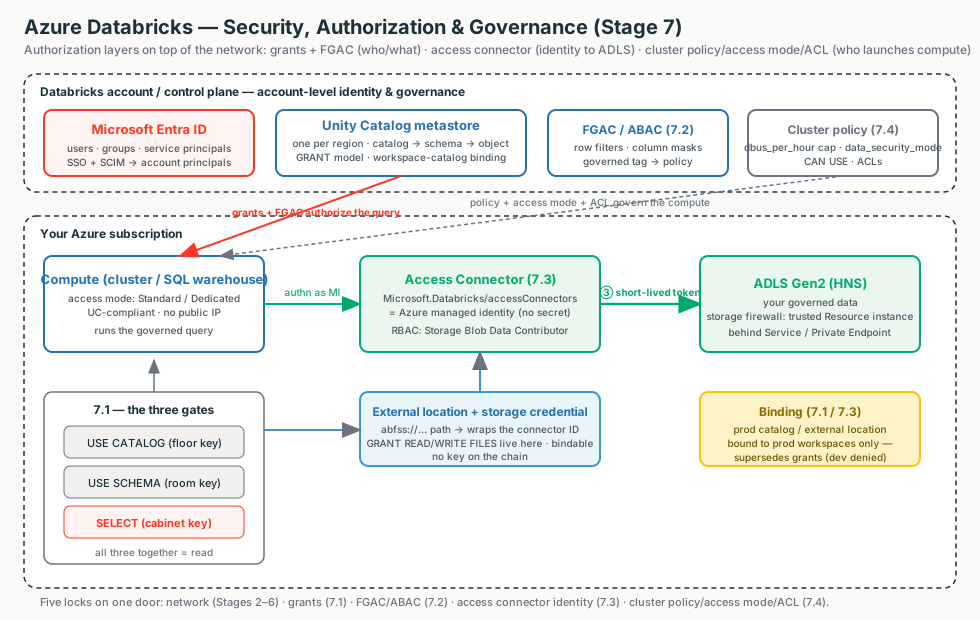
The line a security team wants to hear
"Governance is layered on top of the network you already secured. Unity Catalog is the single account-level authorization layer; row filters, column masks and ABAC redact at query time so there's nothing to bypass; the access connector reaches storage with no key to rotate; and cluster policies cap cost and force UC compliance. Binding pins a data domain to an environment so dev can't touch prod even by accident."
Terms used here (full deep-dive lives in the owning module)
- Principal
- A user, group, or service principal a grant/ACL targets. → Stage 4 (Identity)
- Managed identity
- An Entra ID identity Azure manages for a resource — no secret you store. → Stage 4/6
- RBAC
- Azure's role-at-a-scope model (e.g. Storage Blob Data Contributor) — the Azure-side gate. → Azure foundations
- UDF
- A SQL function UC uses as the FGAC rule engine: row filter returns BOOLEAN, mask returns the column's type. → 7.2
- Governed tag
- Account-level tag with a value list; ABAC keys off these (plain tags can't). → 7.2
- DBU / access mode
- Unit of processing/hr (the
dbus_per_hourcap) · compute security mode (Standard/Dedicated). → 7.4
7.1 · Unity Catalog hierarchy & grants
Unity Catalog is the single, account-level authorization layer — one place to say "who can do what to which object," enforced everywhere. Switch the diagram between the securable hierarchy, the three gates a read needs, and workspace-catalog binding; click any box for the "what + why."
The two-rule mental model (recite this in an interview)
1. Usage privileges are gates, not access — to read a table you need
USE CATALOG and USE SCHEMA and SELECT,
all at once. 2. The usage gate is the owner's control boundary — only a catalog
owner can grant USE CATALOG, so a table owner who grants SELECT still
can't give access unless the catalog owner lets them in.
Grant scope vs blast radius (inheritance)
| Grant at | Applies to | Use when | Risk |
|---|---|---|---|
| Table / view | that object only | surgical, sensitive data | many grants to maintain |
| Schema | all current + future objects in it | a team owns a project schema | future objects auto-exposed |
| Catalog | all schemas + objects | whole-domain access | very broad — use sparingly |
| Metastore | metastore operations only (no inheritance) | platform admins | — |
Illustrative config — the GRANT model
SQL is the primary surface. A reader needs all three grants together.
GRANT USE CATALOG ON CATALOG prod             TO `data-analysts`;  -- gate: enter floor
GRANT USE SCHEMA  ON SCHEMA  prod.sales       TO `data-analysts`;  -- gate: enter room
GRANT SELECT      ON TABLE   prod.sales.orders TO `data-analysts`; -- the actual read
GRANT SELECT ON SCHEMA prod.sales TO `data-analysts`;  -- inherits to ALL current+future tables
GRANT BROWSE ON CATALOG prod TO `account users`;       -- discovery without data access
Binding (no clean SQL): databricks catalogs update prod_catalog --isolation-mode ISOLATED
then workspace-bindings update-bindings. Catalog Explorer: object → Permissions → Grant;
catalog → Workspaces tab → Assign.
Footguns
The main catalog gives all users USE CATALOG by default —
never park regulated data there. Terraform uses underscores (USE_CATALOG)
where SQL uses spaces, and databricks_grants is authoritative (revokes anything not listed).
7.2 · ABAC, row filters & column masks
Once a user has SELECT they see every row and column — often too much. Fine-grained
access control (FGAC) narrows what SELECT returns at query time. Switch the diagram between
the query-time enforcement path and the three mechanisms; click a box
for the "what + why."
The single insight
The filter/mask is just a UDF with an identity check inside
(is_account_group_member()). Dynamic views, table-level bindings, and ABAC policies are
the same idea attached in three places — the view, the table, or the governed tag. Identity
functions run as the INVOKER, which is what makes per-user logic work.
Which mechanism?
| Dynamic views | Table-level filter/mask | ABAC policies | |
|---|---|---|---|
| Scales to many tables | No | No | Yes — one policy, by tag |
| Separation of duties | Weak | Weak | Strong |
| Reshapes / joins data | Yes | No | No |
| Users query | The view | The base table | The base table |
| GA on Azure | Long-standing | DBR ≥ 12.2 LTS | GA (row filters/column masks; verify date & region — GRANT policies Beta) |
Illustrative config — one snippet per mechanism
-- A) Dynamic view: only `auditors` see real emails (grant SELECT on the VIEW).
CREATE VIEW prod.customers.sales_redacted AS
SELECT user_id,
  CASE WHEN is_account_group_member('auditors') THEN email ELSE 'REDACTED' END AS email
FROM prod.customers.sales_raw;

-- B) Table-level row filter (RETURNS BOOLEAN; identity runs as INVOKER) + bind.
CREATE FUNCTION prod.customers.us_filter(region STRING)
  RETURN IF(is_account_group_member('admin'), true, region = 'US');
ALTER TABLE prod.customers.sales SET ROW FILTER prod.customers.us_filter ON (region);

-- C) ABAC: governed tag → one policy auto-covers every tagged column in the schema.
CREATE GOVERNED TAG pii VALUES ('ssn','ccn','dob');
ALTER TABLE prod.customers.accounts ALTER COLUMN ssn SET TAGS ('pii' = 'ssn');
CREATE POLICY mask_ssn ON SCHEMA prod.customers
  COLUMN MASK prod.governance.ssn_last TO us_analysts EXCEPT admins
  FOR TABLES MATCH COLUMNS has_tag_value('pii','ssn') AS ssn ON COLUMN ssn USING COLUMNS (4);
Governed tags: Account Console → Catalog/Settings → Governed tags. Policies: workspace →
Catalog → scope → Policies tab → New policy. CREATE GOVERNED TAG SQL needs DBR 18.1+.
It fails secure, not loud
Below the compute floor (ABAC needs serverless or DBR ≥ 16.4; table-level DBR ≥ 12.2 LTS, dedicated
15.4) queries return no data rather than leak. And is_member()
(workspace-local) silently never matches account groups — use is_account_group_member();
enable spark.sql.ansi.enabled so a type mismatch errors instead of going silently NULL.
7.3 · Storage credentials, external locations & the access connector
The keyless bridge from a governed query to ADLS Gen2 — entirely Path ③ (compute → storage), the identity-and-authorization half. Switch the diagram between the credential chain and physical isolation; click a box for the "what + why."
The one-line chain
External location (path + grants) → storage credential (which identity) → access connector (the managed identity) → RBAC on ADLS Gen2 — and there is no key to copy or rotate anywhere on that chain. Databricks authenticates as the managed identity, gets a short-lived OAuth token, and presents it to ADLS.
How to authenticate UC to ADLS
| Mechanism | Secret to rotate? | Behind storage firewall? | Audited per-user? | Verdict |
|---|---|---|---|---|
| Access connector + managed identity | No | Yes (trusted Resource instance) | Yes | Recommended |
| Service principal + client secret | Yes | No | Yes | Legacy; avoid |
| Storage account key / SAS | Yes | n/a | No — bypasses UC | Never for governed data |
Illustrative config — the two UC securables
CREATE STORAGE CREDENTIAL `finance_mi`
  WITH AZURE_MANAGED_IDENTITY
    ACCESS_CONNECTOR_ID = '/subscriptions//resourceGroups//providers/Microsoft.Databricks/accessConnectors/';

CREATE EXTERNAL LOCATION IF NOT EXISTS `finance_lake`
  URL 'abfss://finance@mystorageacct.dfs.core.windows.net/'
  WITH (STORAGE CREDENTIAL `finance_mi`);

GRANT READ FILES, WRITE FILES ON EXTERNAL LOCATION `finance_lake` TO `finance-engineers`;
Order: (1) access connector → (2) RBAC on ADLS (Storage Blob Data Contributor to
the connector's identity) → (3) storage credential → (4) external location → (5) grants.
Triage rule — split identity from network first
Catalog Explorer → external location → Test connection. Fails on authorization → it's the RBAC/identity half (wrong identity, scope, or HNS off). Fails on reachability/timeout → it's the network half (firewall / private endpoint / DNS). Don't chase RBAC for what is actually a firewall block.
7.4 · Cluster policies & access modes
Three locks on the compute door — what compute can be (policy), who shares it and whether UC trusts it (access mode), and who can touch the object (ACL). Switch the diagram between the three locks and the access-mode comparison; click a box for the "what + why."
Keep the three separate
Policy decides what compute can be (node type, max workers,
dbus_per_hour cap, forced data_security_mode). Access mode
decides who shares it and whether UC trusts it (Standard / Dedicated only). ACL
decides who can touch the object (attach/run/manage). They compose; none replaces another.
Standard vs Dedicated access mode
| Dimension | Standard (USER_ISOLATION) | Dedicated (SINGLE_USER) |
|---|---|---|
| Shared by | Many users, isolated | One user or one group |
| Unity Catalog | ✅ | ✅ |
| Languages | Python, SQL, Scala | + R |
| ML / GPU / RDD / Spark-submit | ❌ | ✅ |
| Best for | Default, BI, collaborative | ML, R, single-team, unsupported-feature workloads |
Illustrative config — the cost + UC-compliance enforcer
{
  "cluster_type":       { "type": "fixed", "value": "all-purpose" },
  "data_security_mode": { "type": "fixed", "value": "USER_ISOLATION", "hidden": true }, // = Standard
  "dbus_per_hour":      { "type": "range", "maxValue": 50 },          // THE cost cap
  "autotermination_minutes": { "type": "fixed", "value": 30, "hidden": true },
  "node_type_id":       { "type": "allowlist",
                          "values": ["Standard_DS3_v2","Standard_DS4_v2"],
                          "defaultValue": "Standard_DS3_v2" }
}
UI: Compute → Policies → Create policy → set Max DBUs/hr + Definitions JSON → grant CAN USE to groups. Access mode: Create compute → Advanced → Access mode. Premium plan required.
Drift & privilege footguns
Editing a policy doesn't restart running clusters — they drift "out of compliance" until you Enforce. Run Now executes as the job owner, not the clicker. Secret ACLs are CLI/API-only and READ reveals every secret in the scope.
Decision guide — what an architect recommends
Always the baseline
- Unity Catalog for governance — no cheaper "skip governance" option, no direct networking cost
- Grant to account groups at the narrowest level (least privilege)
- Access connector + managed identity for storage (keyless, firewall-traversing)
- Cluster policies with a
dbus_per_hourcap + forced UC access mode for any >1-team customer - Premium plan (policies, fine-grained ACLs, Private Link are Premium)
Step up when mandated
- Workspace-catalog / external-location binding (ISOLATED) for provable dev↔prod isolation
- ABAC + governed tags for many tables + central governance (confirm serverless or DBR ≥ 16.4)
- Separate accounts/connectors per sensitivity tier for a hard blast-radius boundary
- Dedicated access mode only for ML / GPU / R
Don't…
- Park regulated data in the
maincatalog (all users getUSE CATALOG) - Use
is_member()(workspace-local) for UC data — useis_account_group_member() - Drive ABAC with ungoverned tags, or drop a UDF before unbinding it
- Grant RBAC to the workspace managed-RG identity instead of the access connector's
- Use a service principal for new/firewalled storage, or leave the Unrestricted policy broadly granted
Don't confuse…
- Binding with grants — binding overrides grants; both must be satisfied
MANAGEwith data access — it manages grants, it doesn't read data- The three compute controls — policy / access mode / ACL compose, none replaces another
- Identity failures with network failures — Test connection splits them
Rule of thumb
UC + access connector + a cost-capped policy is the non-negotiable baseline; binding and ABAC are the step-ups a regulator forces. Governance carries no direct Azure networking cost — the only spend is the FGAC compute floor (may push you to serverless) and the Premium plan.
Customer Q&A — what the security team actually asks
Common asks & the answer
| Customer asks… | Architect answers… |
|---|---|
| "If we lock the network with Private Link, why do we need UC grants?" | The network gates the path to ADLS; UC gates who reads which row. A regulated customer needs both. |
| "Can we mask PII for everyone except a clearance group, provably?" | Yes — a column mask or an ABAC COLUMN MASK policy keyed on a pii governed tag; the EXCEPT group is the clearance list; evidence in system.access.audit. |
| "We have 10,000 tables — hand-bind a mask on each?" | No — tag once (often via Data Classification class.* tags), one ABAC policy at catalog/schema scope, new tables auto-covered. |
| "Where is the storage key, and who rotates it?" | There is none — the access connector's managed identity gets short-lived tokens; nothing to store, leak, or rotate. |
| "Can ADLS stay at 'no public access' and still let Databricks in?" | Yes — the managed identity is allowlisted as a trusted Resource instance (a service principal can't be). |
| "How do we stop a six-figure GPU cluster / guarantee UC on every cluster?" | Fix node_type_id/dbus_per_hour and data_security_mode in a cluster policy; grant CAN USE narrowly. |
What breaks in the field — and the FIRST check
"Granted SELECT, still can't read"
Usually a missing usage gate, an unbound catalog, or a view-owner who can't read the base table.First check: do they hold USE CATALOG + USE SCHEMA (SHOW GRANTS as owner)?
FGAC returns no data after enabling
Below the compute floor it fails secure, not loud.First check: ABAC needs serverless or DBR ≥ 16.4; table-level needs 12.2 LTS.
Mask never applies / filter returns everything
Wrong identity function or ANSI off.First check: is_account_group_member() (not is_member()) + spark.sql.ansi.enabled.
Storage read fails 403
RBAC on the wrong identity, HNS off, or firewall block.First check: Test connection — splits identity (RBAC on the connector, HNS) from network (Resource instance / firewall / DNS).
Dev workspace can reach prod storage
The credential / external location is unbound (metastore-wide).First check: Workspaces binding tab on the credential / external location.
Policy edited but clusters over budget
Policy edits don't auto-restart running compute.First check: the Compliance column → Enforce on next restart.
Three questions to ask before designing governance
- Is there a regulatory mandate to prove environment isolation (dev can't touch prod), or is least-privilege grants enough?
- How many tables need FGAC, and is there a central governance team — i.e. ABAC, or per-table views/masks?
- Are they on Premium, on a UC-compliant access mode, and above the ABAC compute floor (serverless / DBR ≥ 16.4)?