Who Can Read Which Row, and Who Can Launch the Compute
The One Mental Model
Think of governance as a secured office building. The network you locked down in earlier
topics is just the wall around it. A Private Endpoint stops the path; a missing
GRANT stops the query. A regulated customer needs both.
Grants (7.1)
The keys. Need the floor, room, and cabinet key all at once.
FGAC / ABAC (7.2)
Frosted glass: which rows and values you see at query time.
Access connector (7.3)
The keyless contractor badge that reaches ADLS.
Policy / access mode / ACL (7.4)
Three locks on the compute door.
Principal
A user, group, or service principal a grant can target.
Unity Catalog
One account-level place to say who can do what to which object.
Managed identity
An Entra ID identity with no secret you ever see or store.
Binding
Pins a data domain to an environment. Supersedes grants.
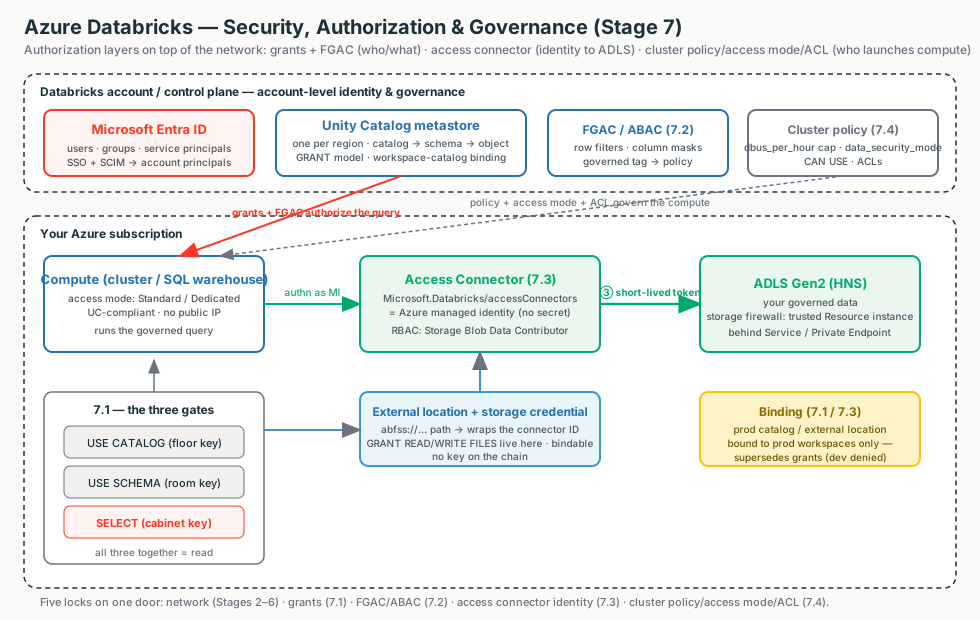
Interactive diagrams live in each tab
Each tab below has its own clickable whiteboard: Access path → Grants, Storage credential chain → Storage Credential, Compute locks → Policies / Access Modes. Open a tab, then click a box to see what it does in plain English.
The one sentence
The network decides which packets reach storage; Unity Catalog decides which principal reads which row; the access connector decides who Databricks proves it is to ADLS; and policies, access modes, and ACLs decide who can launch the compute. Five locks on the same door.
Unity Catalog Grants: Who Can Do What to Which Object
Start here (plain English)
Imagine your data as folders and files, each with its own lock. A grant hands someone a key to one of them. This tab is about who holds which keys — it's about identity and permission, not the network.
Unity Catalog
One account-wide rulebook listing who is allowed to do what to which piece of data.
Grant / privilege
Handing someone a key (a permission like "read this table"); REVOKE takes it back.
Catalog → schema → table
Nested folders and files: catalog holds schemas, a schema holds tables — each level has its own lock.
...in more detail
Simple version: Unity Catalog (UC) is the one place, at the account level, where you say "who
can do what to which object." Data lives in a three-level name: catalog.schema.object.
You control access with two SQL words: GRANT (give a privilege) and REVOKE (take it
away). The thing you grant to is a principal — a user, a group, or a service principal.
Interactive: click the boxes
Click each box to follow a query from login through the grant gate to a filtered, audited result.
The two-rule mental model
- Usage privileges are gates, not access. To read
prod.sales.ordersa user needs three grants together:USE CATALOGonprod+USE SCHEMAonprod.sales+SELECTon the table. - Inheritance cascades. A grant on a catalog or schema applies to all current and future child objects — powerful, and a footgun. Grant at the narrowest level. (Metastore grants are the exception: they do not inherit.)
| Building part | UC object | Key needed to enter |
|---|---|---|
| Building | Metastore (one per region) | — |
| Floor | Catalog | USE CATALOG |
| Room | Schema | USE SCHEMA |
| Cabinet | Table / view / volume | SELECT / READ VOLUME / etc. |
Customer explanation
"To read a table a user needs three things together: permission to enter the catalog, enter the schema, and read
the table. If you grant SELECT alone it still won't work — that missing 'enter the floor' key is the
number-one reason a grant looks broken."
What breaks
- "Granted
SELECT, still can't read" → missingUSE CATALOG/USE SCHEMAgate, unbound catalog, or a view whose owner can't read the base table. - Cross-workspace grant does nothing → granted to the workspace-local
workspace adminsgroup instead of an account group.
ABAC, Row Filters & Column Masks: What Bytes Come Back
Start here (plain English)
A grant lets someone open the table; this tab decides how much of it they actually see. Think of a spreadsheet where some rows are hidden and some cells are blacked out, automatically, depending on who's looking.
Fine-grained access control
Trimming what a SELECT returns at query time, instead of all-or-nothing access to the whole table.
Row filter
Hides whole rows a user shouldn't see (e.g. only their own region's records).
Column mask
Blacks out part of a value (e.g. shows only the last 4 digits of an SSN).
ABAC (tag-based rules)
Tag sensitive columns once; one rule then protects every tagged column, present and future.
...in more detail
Once a user has SELECT, by default they see every row and every column — often too
much. Fine-grained access control (FGAC) narrows what SELECT returns at query time,
transparently. Three tools, oldest to most scalable.
| Mechanism | Scales to many tables? | Reshapes data? | Users query |
|---|---|---|---|
| Dynamic views | No | Yes | The view |
| Table-level filter/mask | No | No | The base table |
| ABAC policies | Yes — one policy, by tag | No | The base table |
The key insight
A filter or mask is just a UDF with an identity check inside. Dynamic views, table-level bindings, and ABAC policies are the same idea attached in three different places — the view, the table, or the governed tag. The identity functions run as the invoker (the person running the query).
ABAC defines a governed tag (pii=ssn), tags the sensitive columns,
then one policy at catalog/schema scope auto-masks every object carrying that tag, now and in future. ABAC for row
filters/column masks is generally available on Azure (verify current GA date and region before quoting).
Customer explanation
"Yes, we can mask PII for everyone except a named clearance group and prove it to auditors. We tag the sensitive
columns once, write one policy at the schema level, and every tagged column — including new tables — is masked
server-side at query time. The clearance group goes in the policy's EXCEPT list, and every decision
is in the system.access audit tables."
Fails secure, not loud
Query returns no data after enabling FGAC → the compute floor: ABAC needs serverless or DBR ≥ 16.4; table-level needs DBR ≥ 12.2 LTS (15.4 for dedicated). It fails secure.
What breaks
- Mask never applies → used
is_member()(workspace-local) instead ofis_account_group_member()(account); or ANSI is off so a type mismatch becameNULL. - Pipeline refresh / time travel / clone fails → the run-as identity isn't in the policy's
EXCEPT.
Storage Credentials, External Locations & the Access Connector
Start here (plain English)
Your data really lives in Azure Storage, which Databricks doesn't own. So Databricks doesn't keep a copy of your storage key — instead it borrows a temporary, scoped key each time it needs to read, like a valet badge that expires in minutes. This tab is the identity side of reaching storage; the network road to it is a separate thing.
Access Connector (managed identity)
An Azure identity Databricks logs in as — with no password or key you ever see or store.
Storage credential
UC's note saying "I'm allowed to use that identity."
External location
A storage path paired with that credential — the thing you actually grant people access to.
Short-lived / scoped token
The temporary valet key Databricks gets per request, instead of a permanent secret.
...in more detail
The bridge between UC's logical permission model and the physical ADLS Gen2 that holds the bytes. Three objects, learned as a chain.
Interactive: click the boxes
Click each box to follow the keyless path from a query to ADLS Gen2.
| Object | What it is |
|---|---|
| Access connector | A first-party Azure resource holding an Azure managed identity — the identity Databricks authenticates as. No keys, nothing to rotate. |
| Storage credential | A UC object that wraps the access connector's resource ID. UC's record of "an auth mechanism I'm allowed to use." |
| External location | A UC object binding a path (abfss://...) to a storage credential. The thing you actually GRANT on. |
The one-line chain
External location (path + grants) → storage credential (which identity) → access connector (the managed identity) → RBAC on ADLS Gen2 — and there is no key to copy or rotate anywhere on that chain.
When a governed job needs data, Databricks authenticates as the managed identity to Microsoft Entra ID, gets a
short-lived OAuth token, and presents it to ADLS. ADLS checks that identity against its RBAC role assignments
(e.g. Storage Blob Data Contributor). Network reachability (Service/Private Endpoint, NCC) and this
credential chain must both succeed for a read.
Customer explanation
"There is no storage key, and nothing to rotate. We create an access connector holding a managed identity, grant it an RBAC role on your ADLS account, and Databricks gets a short-lived token each time. It's also the one mechanism that works while storage is at 'no public access' — the managed identity is allowlisted as a trusted resource, which a service principal can't be."
Triage rule — split identity from network first
Catalog Explorer → external location → Test connection. Fails on authorization → RBAC/identity half. Fails on reachability/timeout → network half (firewall / private endpoint / DNS). Don't chase RBAC for a firewall block.
What breaks
- 403 though the credential validates → RBAC role is on the wrong identity (workspace managed-RG identity, not the access connector's).
- Validation passes, first read fails → HNS not enabled on the storage account.
- Dev workspace can reach prod storage → the credential/external location is unbound.
Cluster Policies & Access Modes: Who Launches Compute
Start here (plain English)
Data rules only matter if the computer running the query is set up to honor them. Think of renting a car: a cluster policy is the rental agreement (which models, how much you can spend), and the access mode is whether it's a private car or a shared shuttle — which decides whether Databricks' governance can ride along.
Cluster policy
A template that caps the size and cost of compute people can launch.
Access modes
Dedicated (one user/group) or Standard (many users, isolated) — both work with Unity Catalog; older modes don't.
Why it matters for governance
If a cluster runs in a non-UC mode, it can sidestep your data rules — so the mode is a security control, not just a setting.
...in more detail
Three distinct controls that decide who can spin up compute, what it can be, and who can touch the objects around it. Keep them separate.
Interactive: click the boxes
Click each box to see the three separate compute controls and how they fit together.
Cluster policy
A template + rulebook capping node type, workers, and $/hour via DBUs. No policy access → no compute.
Access mode
Standard or Dedicated. UC requires one of these. Decides who shares it and what UC features it gets.
Object ACL
The per-door badge reader on each cluster, job, secret scope, notebook.
The policy is JSON mapping an attribute to a limitation. The two levers that matter most:
dbus_per_hour (a range with maxValue — your cost cap) and data_security_mode
fixed to USER_ISOLATION/SINGLE_USER (how you force UC compliance).
| Dimension | Standard (USER_ISOLATION) | Dedicated (SINGLE_USER) |
|---|---|---|
| Shared by | Many users, isolated | One user or one group |
| Unity Catalog | Yes | Yes |
| ML / GPU / R / RDD | No | Yes |
| Best for | Default, BI, collaborative | ML, R, single-team |
Naming note
The UI says Standard (was "Shared") and Dedicated (was "Single user"), but
REST/Terraform still use USER_ISOLATION and SINGLE_USER. Legacy "No Isolation
Shared"/"Custom" are not UC-compliant. Know both names.
Customer explanation
"To stop a six-figure GPU cluster we fix the node types and put a hard dbus_per_hour cap in a policy,
then grant CAN USE narrowly. To guarantee every cluster uses Unity Catalog we fix the access mode in the same
policy. One control bounds cost, the other forces governance, and ACLs decide who can attach to or manage each
object."
What breaks
- "Policy isn't in my dropdown" → no CAN USE, or
cluster_typedoesn't allowall-purpose. - "UC data inaccessible" → a legacy access mode. Check
data_security_mode. - "Edited the policy but clusters over budget" → edits don't auto-restart. Check the Compliance column.
- "Job ran as a high-priv identity" → Run Now executes as the job owner, not the clicker.
- "Secret exposed" → READ on a secret scope reveals every secret in it.
Binding: Where Networking Meets Governance
Start here (plain English)
By default, every workspace on the metastore can see every catalog. A catalog-to-workspace binding makes a catalog visible only to certain workspaces — like making the "prod" folder appear only on the prod team's computers, so the dev workspace can't even see it.
...in more detail
Workspace-catalog binding pins a data domain (a catalog) to a processing environment (a workspace). By default a catalog is reachable from every workspace attached to the metastore; binding overrides that to a chosen set.
Binding supersedes grants
From an unbound workspace, access is denied even with an explicit SELECT. This is
environment isolation that keeps prod data reachable only from prod workspaces. External locations and storage
credentials can be bound the same way.
Customer explanation
"To prove prod data is unreachable from the dev workspace, we bind the prod catalog and the prod storage credential to prod workspaces only. Even if someone has a valid grant, an unbound workspace is denied — and the dev workspace physically can't mint a token to prod storage."
Common confusion
Binding and grants are two separate gates that both must be satisfied. A grant that "silently does nothing" in one workspace is often a binding issue, not a grant issue.
| Question | Lever |
|---|---|
| Can this principal read the object at all? | Grants (7.1) |
| Can this workspace reach the catalog/storage? | Binding (7.1 + 7.3) |
| Can these packets reach storage? | Network path (Topics 5-6) |
Field Notes: How To Think During Troubleshooting
Don't start by memorizing privileges or JSON keys. Start by asking what gate the request is failing.
| Symptom | First Thing To Think |
|---|---|
Granted SELECT, still can't read | Are USE CATALOG/USE SCHEMA gates missing? |
| Read works one workspace, denied in another | Is the catalog ISOLATED and unbound there? |
| FGAC returns no data after enabling | Is the compute below the DBR floor? (fails secure) |
| Mask never applies | Used is_member() instead of is_account_group_member()? |
| Storage read fails | Run Test connection — split identity (RBAC/HNS) from network |
| 403 though credential validates | Is RBAC on the connector identity, not the managed-RG one? |
| Dev workspace reaches prod storage | Is the credential/external location unbound? |
| Policy edited but clusters over budget | Check the Compliance column; enforce on restart |
| Job ran as a high-priv identity | Run Now runs as the job owner — check the owner |
| Secret got exposed | READ on a secret scope reveals the whole scope |
The seven questions
- Can this principal even enter the catalog and schema (the three-grant gate)?
- Once in, which rows and column values should come back for this user?
- Is the catalog bound to the workspace the user is in?
- How does Databricks prove who it is to ADLS — is RBAC on the right identity?
- Is the storage read failing on identity or on network? (Test connection first.)
- Who is allowed to launch compute, and is its cost capped?
- Is the access mode UC-compliant, and who can touch each object via ACLs?