Security: Encryption, Isolation & Compliance
Protect the data, prove the controls
Stages 2–7 locked the doors and hallways (planes, SCC, Private Link, NCC, firewalls). Stage 8 protects what's inside the rooms — the data and the workload — and installs the cameras. Four subtopics, four customer answers: encryption & key custody (8.1), serverless tenant/user isolation (8.2), the certified compliance posture (8.3), and the audit trail + alerting (8.4).
🧠 Mental model — hold this in your head
Locked safes & sealed envelopes (8.1) · a secure hotel with no master key (8.2) · Russian dolls in a certified building (8.3) · one audit stream, two taps (8.4). Encryption is on by default and CMK only changes who holds the key; serverless isolation is proven by architecture — scoped, short-lived tokens and wiped compute; CSP is the permanent certified posture you scope to regulated workspaces; and you prove all of it with system tables + a SIEM export.
Where each subtopic sits on the three-path scaffold (from 2.2)
| Subtopic | What it protects | Path it touches | The one-liner |
|---|---|---|---|
| 8.1 Encryption / CMK | Bytes in motion + at rest; key custody | Rides all three paths | "On by default; CMK = your key, your kill switch." |
| 8.2 Isolation | One tenant/user can't touch another | Path ③ + in-box under all | "Scoped ~1h token, used direct to storage, wiped after." |
| 8.3 ESC/ESM/CSP | Hardened, certified compute posture | Path ② + classic VMs | "CSP is a one-way door — scope it to regulated data." |
| 8.4 Audit/monitoring | Evidence + alerting | Watches all three | "Run both taps — account events live only in system tables." |
Static topology (zoom-crisp, reusable in slides)
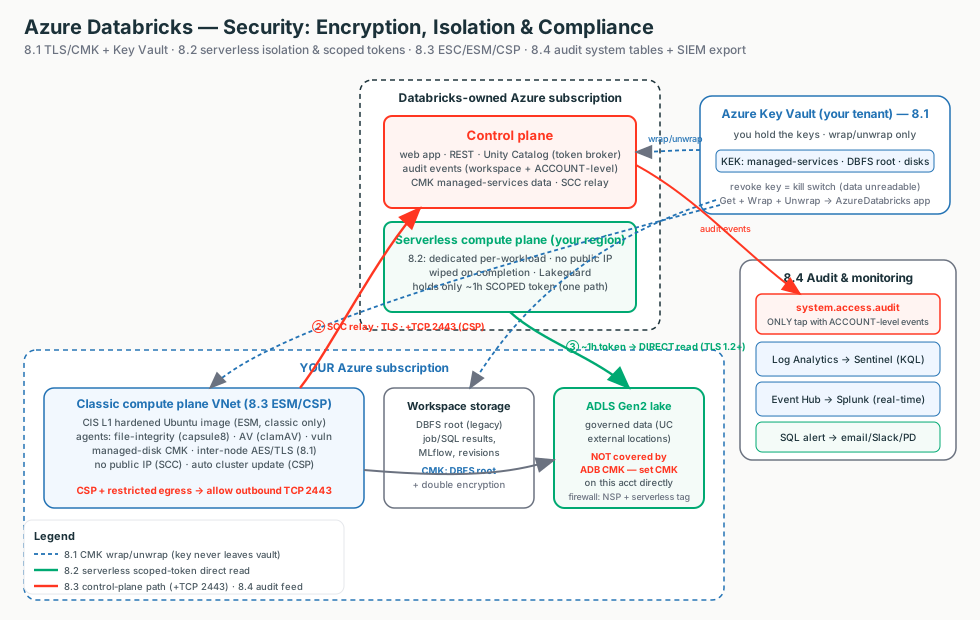
The line a security team wants to hear
"Your data is encrypted in transit and at rest by default; with CMK you hold the key and the kill switch. Serverless isolation is proven by architecture — dedicated compute wiped between workloads, and short-lived, path-scoped tokens used directly to your ADLS. Regulated data runs under the Compliance Security Profile, and every action is captured in an immutable audit trail you can query in SQL and stream to your SIEM."
Terms used here (full deep-dive lives in the owning module)
- Azure Key Vault
- Hardware-backed key store; holds your CMK and does wrap/unwrap so the key never leaves. → 8.1
- KEK / DEK
- DEK encrypts the data; your Key Vault key (KEK) wraps the DEK. Databricks only calls wrap/unwrap. → 8.1
- Access Connector
- The managed identity UC uses to reach ADLS; UC down-scopes from it per request. → Stage 7 / 8.2
- Lakeguard
- Engine-level isolation (Spark Connect, container sandbox, UDF) so shared/serverless compute is UC-compliant. → 8.2
- NSP
- Network Security Perimeter — Azure's logical firewall boundary around your storage account. → 8.2
- CSP / ESM / ESC
- Compliance Security Profile ⊃ Enhanced Security Monitoring; paid for by the ESC add-on. → 8.3
- system.access.audit
- UC-governed audit-log Delta table; the only tap carrying account-level events. → 8.4
- SIEM / Sentinel
- The SOC's central security-log platform; fed via Azure diagnostic settings. → 8.4
8.1 · Encryption: TLS, CMK & Azure Key Vault
Encryption is on by default — TLS 1.2+ in transit, AES-256 at rest. CMK doesn't add a second safe; it swaps whose key opens the existing one from Microsoft's to yours in Key Vault. Switch the diagram between the three CMK features and the TLS-in-transit view; click any box for the "what + why."
The scope gotcha auditors probe (#1 misunderstanding)
None of the three CMK features encrypt your ADLS Gen2 data lake — that's a separate storage account you CMK directly in Azure Storage. CMK-for-DBFS-root only covers the workspace root container (which you shouldn't use for governed data anyway).
Microsoft-managed vs Customer-Managed Keys
| Dimension | Microsoft-managed (default) | CMK |
|---|---|---|
| Who holds the key | Microsoft | You, in Azure Key Vault |
| Setup | None — automatic | Premium + Key Vault + grant + workspace config |
| Revocation ("kill switch") | No | Yes — disable/delete key → data unreadable |
| Re-encrypts existing data | n/a | No — future writes only |
| When to use | Most workloads; "is it encrypted?" = yes | Regulated data needing customer key custody |
Illustrative config — CMK at workspace creation
Terraform (azurerm) — the encryption arguments. Verify exact names against current provider docs; full CMK + Key Vault IaC is the Stage 8 hands-on artifact.
resource "azurerm_databricks_workspace" "this" {
  sku = "premium"                                              # CMK requires Premium
  managed_services_cmk_key_vault_key_id = azurerm_key_vault_key.ms.id    # control-plane data
  managed_disk_cmk_key_vault_key_id     = azurerm_key_vault_key.disk.id   # classic VM disks
  customer_managed_key_enabled      = true   # DBFS-root CMK
  infrastructure_encryption_enabled = true   # DOUBLE encryption (deploy-time only)
}
Portal: Entra ID → Enterprise apps → AzureDatabricks · Key Vault (purge protection) →
RSA key → IAM → Key Vault Crypto Service Encryption User to the app + storage MI · Create workspace →
Encryption tab → Use your own key → paste the Key Identifier.
Irreversible & brick-risk
Managed-services CMK cannot be disabled; double encryption is deploy-time only;
use a specific key version (never latest); and a deleted key without purge protection
permanently bricks the data and workspace login. Inter-node shuffle is unencrypted by default —
use Azure VNet encryption.
Uses, edge cases & limitations
- Uses: default TLS+at-rest answers "is it encrypted?" for free; CMK when an auditor requires customer key custody/rotation/revocation of control-plane data, workspace storage, or VM disks.
- Edge cases: CMK doesn't cover the ADLS lake; rotation needs the old key kept 24h; existing data isn't re-encrypted; managed-disk CMK doesn't apply to serverless (ephemeral disks).
- Limitations: all CMK = Premium + same-tenant Key Vault; managed-services CMK irreversible; key must be RSA, version explicit; double encryption deploy-time only.
8.2 · Compute Security & Isolation
The serverless trust question: "if compute runs in Databricks' account, what stops another tenant — or Databricks — from reading our data?" The answer is architecture, not your perimeter. Switch the diagram between the scoped-token data flow and the isolation layers; click any box.
The exam answer — three claims in one breath
Authorization happens before the credential is minted, the credential is scoped and short-lived (~1h), and the control plane hands it over but is never on the data path. A stolen token buys an attacker one path for one hour — that's the confused-deputy defence.
Classic vs serverless isolation
| Dimension | Classic | Serverless |
|---|---|---|
| Primary isolation | "Natural" — your subscription + VNet | Platform-enforced: dedicated compute, private no-public-IP net, wipe on completion |
| Credential to storage | UC down-scoped token (or legacy cluster identity) | ~1h scoped token, per workload, direct to storage |
| Compute reuse | Cluster persists until terminated | Per-workload; wiped, no cross-tenant reuse |
| In-cluster multi-user | Lakeguard (Standard mode) | Lakeguard (incl. Python UDF isolation) |
| Storage firewall | NCC subnet IDs / endpoints | NSP + AzureDatabricksServerless tag, or NCC PE |
Illustrative config — the UC scoped-credential chain
Terraform — core isolation (wipe, 1h token) is platform-enforced; you wire the plumbing.
resource "azurerm_databricks_access_connector" "uc" {   # the managed identity UC uses
  identity { type = "SystemAssigned" }
}
resource "azurerm_role_assignment" "uc_blob" {          # least privilege — NOT Owner/account key
  scope = azurerm_storage_account.adls.id
  role_definition_name = "Storage Blob Data Contributor"
  principal_id = azurerm_databricks_access_connector.uc.identity[0].principal_id
}
resource "databricks_external_location" "this" {        # binds credential to one path (isolation unit)
  url = "abfss://data@${azurerm_storage_account.adls.name}.dfs.core.windows.net/"
  credential_name = databricks_storage_credential.this.name
}
Portal: NSP → Create (region = workspace region) → Associate ADLS (Transition mode) →
Inbound rule: Service Tag AzureDatabricksServerless.<region> · Access Connector → ADLS IAM →
Storage Blob Data Contributor → External Locations bind the abfss:// path · Compute → access mode =
Standard (Lakeguard).
Time-sensitive (verify) & gotchas
By 2026-06-09 a storage account that allowlisted serverless subnet IDs must move to an
NSP + the AzureDatabricksServerless service tag. Stay in Transition
mode (Enforced blocks all non-matching traffic). The 1-hour token is not a network control — still need
the storage firewall + egress policy. NSP Terraform coverage lags the Portal.
Uses, edge cases & limitations
- Uses: approving serverless for a regulated customer; designing the access-connector → storage-credential → external-location chain; picking Standard mode for safe multi-user classic clusters.
- Edge cases: the 2026-06-09 firewall migration; NSP enforced mode breaks other services; direct
abfss://path access denied outside UC securables; Standard-mode capability gaps (no DBR ML/GPU/RDD/Scala) push some to Dedicated. - Limitations: core isolation isn't tunable; the serverless service tag is for inbound rules to Azure Storage in the workspace region only; NSP Terraform coverage lags the Portal.
8.3 · Compliance: ESC, ESM & CSP
Three layers customers conflate, nested like Russian dolls: ESC (the paid add-on/bill),
ESM (hardened image + agents, classic only), CSP (the umbrella posture +
standards). CSP ⊃ ESM ⊃ hardened image. Switch the diagram between the nesting and
the classic-plane impact; click any box.
CSP is a one-way door
Enabling CSP or attaching a standard is intended to be permanent — you can't remove it from a workspace that has processed regulated data; the only path back is delete + rebuild. Scope CSP to the workspaces that actually touch regulated data, and settle topology before the first regulated row lands.
ESC vs ESM vs CSP
| ESC (add-on) | ESM | CSP | |
|---|---|---|---|
| What it is | Paid entitlement/SKU | Hardened image + agents | Umbrella posture + standards |
| Scope | Account/billing | Classic only | Classic + serverless (by standard/region) |
| Reversible? | n/a | Yes | No — permanent once regulated data processed |
| Restricts features | No | No | Yes — GA + named-preview allow-list only |
| New network req | No | No | TCP 2443 (if egress restricted) + Azure VNet encryption |
Illustrative config — CSP + ESM + auto-update
Terraform (azurerm) — NOTE: only HIPAA / PCI_DSS / NONE here; other standards need Portal/CLI/PS/ARM.
resource "azurerm_databricks_workspace" "this" {
  sku = "premium"                                          # ESC requires Premium
  enhanced_security_compliance {
    automatic_cluster_update_enabled      = true            # permanent under CSP
    compliance_security_profile_enabled   = true            # CSP on (PERMANENT!)
    compliance_security_profile_standards = ["HIPAA", "PCI_DSS"]   # or ["NONE"]
    enhanced_security_monitoring_enabled  = true            # ESM agents + hardened image
  }
}
# On a restricted-egress VNet, also allow: Outbound TCP  -> * : 2443
Portal: workspace → Settings → Security & compliance → enable compliance security profile → pick standard(s) in-region or None → enable ESM → enable automatic cluster update. Confirm: a shield icon appears by the workspace name.
Time-sensitive (verify)
HIPAA / HITRUST / IRAP become CSP-mandatory on 2026-09-01. Serverless standard support is narrower & region-specific than classic — always verify the standard × region × plane cell. Gen2/Arm64 VMs are blocked under ESM/CSP.
Uses, edge cases & limitations
- Uses: regulated workspaces (CSP + matching standard); high internal bar without attestation (CSP
NONE); hardened image/monitoring on classic without permanence (ESM-only). - Edge cases: permanence (delete+rebuild to revert); serverless region gaps; restricted-preview surface blocks brand-new previews; Gen2/Arm64 excluded; forgetting TCP 2443; AI features off by default.
- Limitations: Premium + ESC required & billed; ESM classic-only; Terraform standards subset (HIPAA/PCI_DSS/NONE); you own log review.
8.4 · Audit Logs, System Tables & Monitoring
One audit stream, two taps. System tables (system.access.audit) you query in SQL —
the only tap carrying account-level events; Azure diagnostic settings export to your SIEM — workspace-level
only. Switch the diagram between the two taps and the SIEM bridge; click any box.
The trap — the account-level blind spot
Account-admin changes, account-level SCIM, and metastore-level grants appear only in
system.access.audit (workspace_id = 0), never in Azure diagnostic settings. A
SIEM-only strategy has a blind spot — the enterprise answer is always both taps.
Choosing your audit/monitoring path
| Need | Use | Why |
|---|---|---|
| Ad-hoc "who touched X" | system.access.audit | One SQL query, 365-day, incl. account events |
| Central enterprise SIEM | Diagnostic → Event Hub / Log Analytics → Sentinel/Splunk | Native Azure bridge; single pane of glass |
| > 365-day / immutable archive | Diagnostic → Storage (WORM) | System-table free retention is 365 days |
| Sub-minute detection | Diagnostic → Event Hub → SIEM | System tables lag (mins–hours) |
| In-platform scheduled detection | Databricks SQL Alert over system tables | No extra infra; email/Slack/PagerDuty |
Illustrative config — grant, alert query & SIEM export
SQL — least-privilege grant + a failed-login alert (the event_date predicate is required).
GRANT SELECT ON TABLE system.access.audit TO `secops-analysts`;

SELECT user_identity.email AS user_email, count(*) AS failed_logins
FROM system.access.audit
WHERE event_date >= current_date() - INTERVAL 1 DAY        -- prune partitions (REQUIRED)
  AND service_name = 'accounts'
  AND action_name IN ('login','aadBrowserLogin','tokenLogin')
  AND response.statusCode <> 200                            -- 200 = success; non-200 = the signal
  AND event_time >= current_timestamp() - INTERVAL 15 MINUTES
GROUP BY user_identity.email HAVING failed_logins >= 5;
Terraform — export workspace logs to Log Analytics for Sentinel.
resource "azurerm_monitor_diagnostic_setting" "adb_audit" {
  target_resource_id         = azurerm_databricks_workspace.this.id
  log_analytics_workspace_id = azurerm_log_analytics_workspace.sec.id
  enabled_log { category = "accounts" }      # auth, tokens, IP ACLs
  enabled_log { category = "unityCatalog" }  # grants, securable access
  # use a dynamic block — Databricks adds categories over time
}
Portal: Catalog Explorer → system → confirm system.access.audit ·
workspace resource → Monitoring → Diagnostic settings → + Add → categories → Log Analytics /
Storage / Event Hub · SQL → Alerts → Create → paste query → condition → schedule → notifications.
Edge cases & limitations
Audit table is Public Preview (free during preview); 365-day free retention;
not real-time (match alert cadence to ingestion latency); broad scans rejected (always filter
event_date); a few services (cluster policies, vector search, legacy groups) don't emit to diagnostic
settings.
This module ships a runnable companion: audit_monitoring.sql (grants + failed-login,
sensitive-table, privilege-change, ESM-agent and cost-anomaly queries).
Decision guide — what an architect recommends
Reach for it
- CMK when a regulator demands customer key custody / revocation
- Azure VNet encryption when "encrypted at all times" must include shuffle
- Serverless + CSP as the regulated default (fast, smallest blast radius)
- CSP + standard to process data under a named standard (hard gate)
- CSP
NONEfor a strict internal bar with no attestation - System tables + SIEM export together for the complete audit answer
Don't…
- Expect CMK to cover the ADLS data lake (CMK that account directly)
- Use
latestas the key version or skip purge protection - Put a standing storage key / broad MSI secret on compute
- Flip the NSP to Enforced, or forget the CSP TCP 2443 egress rule
- Blanket-enable ESC/CSP across dev sandboxes (bills + restricts each)
- Treat the SIEM as complete — account-level events live only in the system table
Rule of thumb
Encryption defaults are enough until a regulator wants the key. Serverless + CSP is the regulated default; classic + VNet injection only when the network path must live in the customer's subscription. CSP is permanent — scope it. And audit = system tables for completeness + SIEM export for correlation, never one alone. Premium is the non-negotiable baseline (CMK / CSP / IP ACLs / Private Link are all Premium; CSP/ESM also bill the ESC add-on).
Customer Q&A — what the security team actually asks
Common asks & the answer
| Customer asks… | Architect answers… |
|---|---|
| "Encrypted in transit & at rest, and who holds the keys?" | Yes to both by default (TLS 1.2+ / Microsoft-managed AES-256); CMK is how you hold the key. |
| "Can we revoke Databricks' access unilaterally?" | Yes — disable/delete the Key Vault key (kill switch within the DEK cache window). |
| "Does CMK cover our ADLS data lake?" | No — that's a separate storage account you CMK directly. (The #1 misunderstanding.) |
| "If serverless runs in Databricks' account, what stops another tenant reading our data?" | Dedicated per-workload compute wiped on completion, no warm pool; UC vends ~1h path-scoped tokens used direct to ADLS; the control plane mints but never proxies bytes. |
| "Are you HIPAA / PCI / IRAP?" | The platform holds the attestations, but processing regulated data needs CSP + the matching standard on the workspace — and it's permanent. |
| "Where's the audit trail / can you feed our SIEM?" | System tables (365-day, incl. account-level) and Diagnostic export to Sentinel/Splunk. Account-level events are only in the system table — run both. |
What breaks in the field — and the FIRST check
Login/reads fail after a key change
Key disabled/expired or the wrap/unwrap role was removed.First check: Key Vault key enabled + AzureDatabricks app / storage MI still hold wrap/unwrap.
Auditor: "lake isn't customer-keyed"
CMK was set on the workspace, not the data lake.First check: CMK on the ADLS Gen2 storage account itself.
Serverless 403 to firewalled storage
Wrong region tag or a stale subnet-ID rule.First check: regional AzureDatabricksServerless.<region> tag, NSP in Transition.
CSP compute won't start on a locked VNet
Missing the new outbound rule.First check: outbound TCP 2443 (+ Azure VNet encryption / supported VM type).
Cluster won't launch on CSP/ESM
Unsupported instance family.First check: VM isn't Gen2 or Arm64.
SIEM "missing" account-admin events
They're ACCOUNT_LEVEL, never in diagnostic settings.First check: query system.access.audit where workspace_id = 0.
"Query returned too much data"
No partition pruning on the system table.First check: add an event_date predicate.
Multi-user job sees another user's data
Wrong access mode / legacy cluster.First check: access mode is Standard (Lakeguard), not Dedicated-misused.
Three questions to ask before recommending
- Is there a mandate for customer-held keys (CMK), or do encryption defaults suffice?
- Must you process data under a named standard — and is the standard supported on your plane × region (CSP is permanent)?
- Do you have a mandated central SIEM / >365-day / sub-minute requirement (then both taps), or is in-platform investigation enough?