Synthesis, Best Practices & Interview Prep
One map, three doors, four floor plans
Every earlier lesson taught one control. This capstone assembles them. A reference architecture is just a choice of one control on each of the three connectivity paths (the scaffold from Stage 2.2), plus identity, governance, and encryption on top. You never invent a new map — you pick the closest of four floor plans and adapt.
🧠 Mental model — hold this in your head
A reference architecture is a floor plan for a secure building, and every question is "which lock goes on which of three doors — and what's the cheapest lock the regulator will accept?" ① user→workspace (front door) · ② compute↔control (staff intercom, outbound-only) · ③ compute→storage (loading dock). Pick the closest of four floor plans, harden the three doors with the cheapest lock that meets the compliance language, and be able to walk the packet and name what breaks at each hop.
The three doors — the scaffold the whole topic rests on
| Path | Who talks to whom | Floor control (free) | Mandated upgrade |
|---|---|---|---|
| ① User → workspace | Browser / BI / REST → workspace URL | IP access list | Front-end Private Link + public access Disabled |
| ② Compute ↔ control | Cluster dials home (SCC relay, 443) | VNet injection + SCC | Back-end Private Link |
| ③ Compute → storage | Cluster reads/writes ADLS Gen2 | Storage firewall + Service Endpoint | Private Endpoint / NCC PE (+ firewall DEP) |
Static topology — the full-DEP reference (zoom-crisp, reusable in slides)
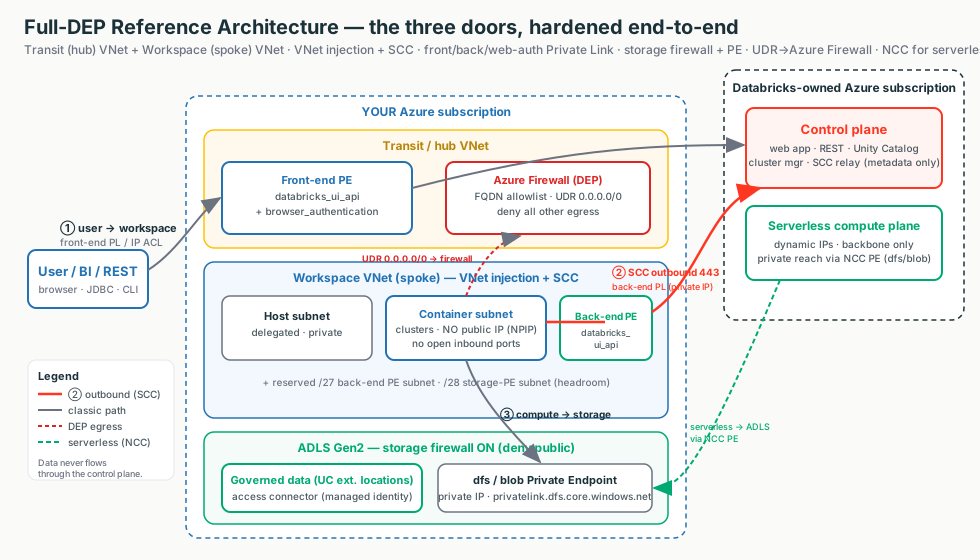
The line a security team wants to hear
"We don't custom-build per customer — we pick the closest of four references and adapt. A lot is already off the public internet by default; Private Link, NCC private endpoints, and the firewall DEP just remove the last public-IP hop and stop a compromised notebook from reaching an attacker."
Terms used here (full deep-dive lives in earlier modules)
- SCC / back-end PL
- SCC removes inbound (no public IP); back-end Private Link removes the public-IP hop. → Stage 2.3 / 3.1
- Front-end / web-auth PL
- Private user→workspace + the SSO callback endpoint (one per region/DNS zone). → Stage 3.1
- NCC
- Account-level, regional object giving serverless private reach (PE rules: dfs/blob). → Stage 5.2
- DEP
- UDR 0.0.0.0/0 → Azure Firewall with an FQDN allowlist — anti-exfiltration. → Stage 3.4
- CMK / CSP
- Customer-managed keys + the Compliance Security Profile for regulated workloads. → Stage 8
9.1 · Reference architectures end-to-end
Four blueprints an Azure Databricks SA draws from memory. Switch the diagram between them — the same three doors, hardened differently — and click any box for the "what + why." IP sizing shows the node-count math.
Why a separate transit VNet (Standard)
The browser_authentication endpoint is one per region per DNS zone and a
single point of failure for SSO. Isolate it in a dedicated, delete-locked "web-auth workspace" so deleting
a spoke never breaks login for the others. And size subnets for peak — CIDR is immutable.
Walk a packet (full-DEP) — name the control, and why it breaks without it
| Hop | Control(s) | WHY IT BREAKS without it |
|---|---|---|
| 1 · User → workspace URL | Front-end PL; IP ACL / public access Disabled | URL resolves to a public IP — open to the internet |
| 2 · SSO callback | browser_authentication PE | SSO callback has no route — login fails region-wide |
| 3 · CP schedules cluster | SCC/NPIP; VNet injection; delegation | VMs get public IPs + open inbound ports |
| 4 · Cluster → control plane | Back-end PL; SCC reversed call | Outbound rides the public internet to the relay |
| 5 · Cluster → ADLS Gen2 | Storage firewall; SE/PE; UC ext. location | Data path on public internet; storage open |
| 6 · Any other egress | UDR + Azure Firewall (DEP) | Compromised notebook exfiltrates to any host |
Illustrative config — the load-bearing lines
Terraform — VNet injection + SCC, sized for peak. Full module is the optional Stage 9 hands-on artifact.
resource "azurerm_virtual_network" "ws" {
  address_space = ["10.50.0.0/16"]                    # /16: room for big subnets + PE subnets
}
resource "azurerm_subnet" "container" {               # "private" subnet — private under SCC
  address_prefixes = ["10.50.4.0/22"]                 # /22 -> ~1,019 nodes peak; immutable later
  delegation { name = "dbx"; service_delegation { name = "Microsoft.Databricks/workspaces" } }
}
resource "azurerm_databricks_workspace" "this" {
  sku                                   = "premium"   # Private Link / CMK / CSP require Premium
  public_network_access_enabled         = false       # full-private (DEP); true for hybrid Standard
  network_security_group_rules_required = "NoAzureDatabricksRules"   # required with back-end PL
  custom_parameters { no_public_ip = true }           # SCC / No Public IP
}
Portal: Create → Azure Databricks → Networking → No Public IP = Yes, Deploy in your own VNet = Yes, Public Network Access Disabled (DEP), Required NSG Rules = NoAzureDatabricksRules.
FQDN allowlist (DEP) — allowlist names, not IPs
Control plane / SCC relay: *.azuredatabricks.net · data-plane: adb-dp-<id>.<n>.azuredatabricks.net
· CDN assets: *.cloud.databricksusercontent.com — all 443. Don't route the SCC relay /
back-end-PL traffic through the firewall (already private; needless hop).
9.2 · Networking & security best-practices checklist
The pre-flight checklist laid over the three doors. For each door, ask: what's the floor, and what do I add only when a mandate pays for it? Toggle the diagram between the floor (free, always-on) and the mandated upgrades; click any box for the "what + why."
The reasoning trick
When someone asks "is this workspace secure?", don't recite features — walk the three doors and at each name (a) the floor control and (b) the mandated upgrade. Ten MUST items are the airframe; five amber items (back-end PL, front-end PL, storage PEs, CMK, firewall DEP) are bolt-ons only when the regulatory profile pays for the cost.
Non-negotiable vs "only when mandated"
| Item | Tier | Always do? | Trade-off / when overkill |
|---|---|---|---|
| VNet injection + SCC | Any | Yes | None — the floor |
| Size subnets for peak | Any | Yes | Free; only failure is too small |
| NAT gateway egress | Any | Yes | Small hourly + per-GB |
| Storage firewall + Service Endpoints | Any | Yes | Free; default storage choice |
| Premium plan | Premium | Yes | Higher per-DBU cost |
| SSO + SCIM + MFA + separate admins | Any | Yes | Setup effort only |
| Unity Catalog for governed data | Any | Yes | Migration effort |
| Cluster policies + UC access mode | Premium | Yes | Friction for power users |
| Audit logging / system tables | Any (Preview) | Yes | Storage/SIEM cost |
| IaC for everything | Any | Yes | Up-front authoring |
| Back-end Private Link | Premium | When internal traffic must be private | Per-endpoint cost |
| Front-end PL + public access Disabled | Premium | When "no public ingress" mandated | Transit VNet, DNS, web-auth |
| Private Endpoints to storage | Any | When private IP on storage mandated | Per-GB — validate first |
| CMK | Premium | When key custody mandated | Key Vault ops + lockout risk |
| Azure Firewall DEP | Any | When exfil-sensitive | Cost + hop; don't route SCC through it |
Illustrative config — the items unique to this synthesis lesson
# Item 4.3 — IP access list (enforcement must be ON, else stored-but-not-applied)
resource "databricks_workspace_conf" "this" {
  custom_config = { "enableIpAccessLists" = "true" }   # turn the feature ON
}
resource "databricks_ip_access_list" "allow_corp" {
  list_type    = "ALLOW"                                # an ALLOW list flips to default-deny
  ip_addresses = ["203.0.113.0/24"]                     # block lists win, evaluated first
}
# Item 5.2 — cluster policy: block legacy "No Isolation Shared"
#   data_security_mode allowlist: ["USER_ISOLATION","SINGLE_USER"]  # UC-compliant modes only
-- Item 6.1 — who changed permissions / failed to log in (Public Preview table; verify)
SELECT event_time, user_identity.email, action_name, source_ip_address
FROM system.access.audit
WHERE event_date >= current_date() - INTERVAL 7 DAYS
AND (action_name ILIKE '%Permission%' OR action_name ILIKE '%login%');Portal: IP access lists = Account Console → Settings → Security → IP access lists; MFA is enforced in Entra ID Conditional Access (not a Databricks toggle).
9.3 · Customer-conversation & interview scenarios
The five whiteboard answers an SA gives cold. Switch the diagram between scenarios — each highlights the door(s) in play and the control that locks it. The golden rule for all five: trace the packet, name the control at each hop, state the trade-off, and know what breaks.
Service Endpoint vs Private Endpoint (Scenario 2)
| Dimension | Service Endpoint | Private Endpoint |
|---|---|---|
| What it is | Subnet "tag" routing to a service over the backbone | NIC with a private IP mapped to one service |
| Storage FQDN resolves to | Public IP (firewall trusts the subnet) | Private IP (via privatelink.dfs.core.windows.net) |
| Cost | Free | Per-hour + per-GB |
| On-prem / cross-VNet reach | No | Yes |
| Serverless equivalent | NCC default rules expose SE subnet IDs | NCC private endpoint (dfs/blob) |
Config proof — serverless private ADLS via NCC (Scenario 4)
# Databricks CLI (account admin). dfs = ADLS data; blob = model artifacts (you may need both).
databricks account network-connectivity create-network-connectivity-configuration \
  --json '{"name":"ncc-eastus","region":"eastus"}'
databricks account network-connectivity create-private-endpoint-rule <NCC_ID> \
  --json '{"resource_id":".../storageAccounts/<ADLS>","group_id":"dfs"}'
# -> APPROVE on the storage account: Portal -> Storage -> Networking -> Private endpoint connections.
#    Rule status: PENDING -> ESTABLISHED.  Quotas: 10 NCCs/region, 100 PEs/region, 50 workspaces/NCC.
Interview-fatal traps
Conflating SCC and Private Link (SCC = no public IP/no inbound; PL = no public hop — say both). "Just whitelist the serverless IPs" (they're dynamic — it's NCC). Routing the SCC relay through the firewall (needless hop). Quoting Preview as GA (inbound PL for performance-intensive services is Preview — verify per region).
Decision guide — which blueprint, which controls
Standard (default for production)
- Multi-workspace production estate (Premium)
- Hub-and-spoke with a separate transit VNet
- VNet injection + SCC + back-end Private Link
- Delete-locked web-auth workspace for SSO
- Use unless cost forces Simplified or compliance forces DEP
Full DEP / regulated
- Bank / health / gov / PII, "no public egress" mandate
- Full Private Link + public access Disabled
- UDR 0.0.0.0/0 → Azure Firewall, FQDN allowlist
- Storage firewall + dfs/blob PEs + NCC PEs for serverless
- CMK + Compliance Security Profile; justify the cost as audit sign-off
Don't reach for DEP / Private Endpoints when…
- Traffic is already backbone-private and there's no "no public-IP hop" mandate
- A storage firewall + free Service Endpoint already satisfies the requirement
- The customer just wants front-door control — use IP access lists
- It's non-prod / single-team / one region — use Simplified
Don't…
- Quote Simplified for a regulated customer (no DEP firewall)
- Route the SCC relay / back-end-PL through the firewall
- Size subnets for today — CIDR is immutable, size for peak
- Leave Public Network Access Enabled on a "fully private" design
- Allowlist IPs instead of FQDNs (they rotate)
Rule of thumb
Start free, step up only when mandated. SCC + VNet injection (②) and storage firewall + Service Endpoint (③) cost nothing and are backbone-private. Add Private Link / NCC PEs / firewall DEP / CMK only when a regulator demands no public-IP hop or on-prem reach. Premium + Unity-Catalog-on-ADLS is the non-negotiable baseline; the IP-exhaustion layout applies to every design.
Customer Q&A — what the security team actually asks
Common asks & the answer
| Customer asks… | Architect answers… |
|---|---|
| "Walk me through how a query reaches our private storage without touching the internet." | Hop-by-hop: front-end PE → SSO via web-auth PE → SCC outbound + back-end PL → UC-governed ADLS via storage PE → any other egress via Azure Firewall FQDN allowlist. |
| "Does any traffic ever touch the public internet?" | Front/back-end Private Link + NCC PEs + storage firewall. SCC alone is backbone-but-public-IP, so "no public hop" is true only once back-end PL is on. |
| "Can we get a stable egress IP for our allowlist?" | Azure NAT Gateway for classic. Serverless has no static IP — use NCC, not an IP. |
| "How do we stop a compromised notebook from exfiltrating data?" | UDR 0.0.0.0/0 → Azure Firewall FQDN allowlist (DEP) + a serverless egress/network policy (default-deny). |
| "Service Endpoint or Private Endpoint for our ADLS?" | Default to Service Endpoints (free, backbone). Private Endpoints only when "no public IP, ever" or on-prem/cross-VNet reach is mandated. |
| "Can we start Simplified and move to full DEP later?" | Yes, but folding egress into the workspace VNet makes the firewall retrofit harder — plan the transit VNet now if DEP is on the roadmap. |
| "What needs Premium, and what's still Preview?" | PL / CMK / CSP / IP ACLs / audit delivery = Premium; inbound PL for performance-intensive services = Public Preview — verify per region. |
What breaks in the field — and the FIRST check
SSO down for a whole region
The shared browser_authentication host workspace was deleted/changed.First check: does it still exist and does *.pl-auth.azuredatabricks.net resolve to the PE private IP?
"Private" URL resolves to a public IP
Custom/on-prem DNS isn't forwarding the zone.First check: spoke DNS conditional-forwards *.privatelink.azuredatabricks.net to Azure DNS.
"Cluster failed to start: insufficient IPs"
Container subnet at the ceiling on autoscale.First check: prefix vs node count against 2^(32−n) − 5; CIDR is immutable.
Cluster can't read its own ADLS
Storage firewall on, allow rule missing.First check: storage Networking blade — is the SE subnet or the PE in the allow rules with default Deny?
Serverless query to private storage hangs
NCC PE rule never approved.First check: rule status PENDING (approve on the storage account) + dfs vs blob group ID.
Egress fails after adding the firewall
FQDNs not allowed, or SCC forced through the firewall.First check: application rules for the Databricks FQDNs; SCC/back-end-PL should NOT route through it.
Three questions to ask before recommending an architecture
- Is there a regulatory mandate for no public-IP hop / no public egress, or is backbone-private enough?
- Multi-workspace production (Standard), non-prod single-team (Simplified), or regulated PII (full DEP)?
- Where will governed data live, are you on Premium, and have you sized subnets for peak (CIDR is immutable)?