FDE Field Playbooks
Troubleshoot & design on the three-path map
Stages 1–9 taught how VNet injection, SCC, Private Link, NCC, DEP and Unity Catalog storage access work. Stage 10 turns that into runbooks (symptom → first check → root cause → fix), the decision flow for picking a deployment pattern, and the diagnostics & escalation discipline that resolves a case on round-trip one.
🧠 Mental model — hold this in your head
You are an air-crash investigator standing on the three-path map. Every fault lands on
exactly one path — ① user → Databricks, ② compute ↔ control plane, ③ compute →
storage. So: (1) which path is failing? (the symptom tells you), (2) read
that path's black box (termination reason, nslookup, storage error, flow-log
DENY), (3) run ONE check, not ten — backwards from the message, not forwards
from the architecture. Design (10.4) is the same map run forwards; diagnostics (10.5) is it turned into
evidence — collect first, theorise second.
The five playbooks at a glance
| Subtopic | Path | Tell-tale symptom | First check |
|---|---|---|---|
| 10.1 Startup | ② + plumbing | "Cluster won't start" / terminated with a reason | Read termination reason → quota / Available-IPs / NSG-UDR / delegation |
| 10.2 Connectivity | ① + ② | "Can't log in" / "login spins" / "Control Plane Request Failure" | nslookup from the failing network |
| 10.3 Storage/Serverless | ③ | "403 reading ADLS" / "serverless can't reach storage" | Error string → network vs identity gate; classic vs serverless |
| 10.4 Decision flow | all (design) | "Which architecture for us?" | Ask the four mandate questions → name the rung |
| 10.5 Diagnostics | all (evidence) | "Prove what broke" / "where do logs go?" | Status first → match symptom to layer → read its black box |
Static topology (zoom-crisp, reusable in slides)
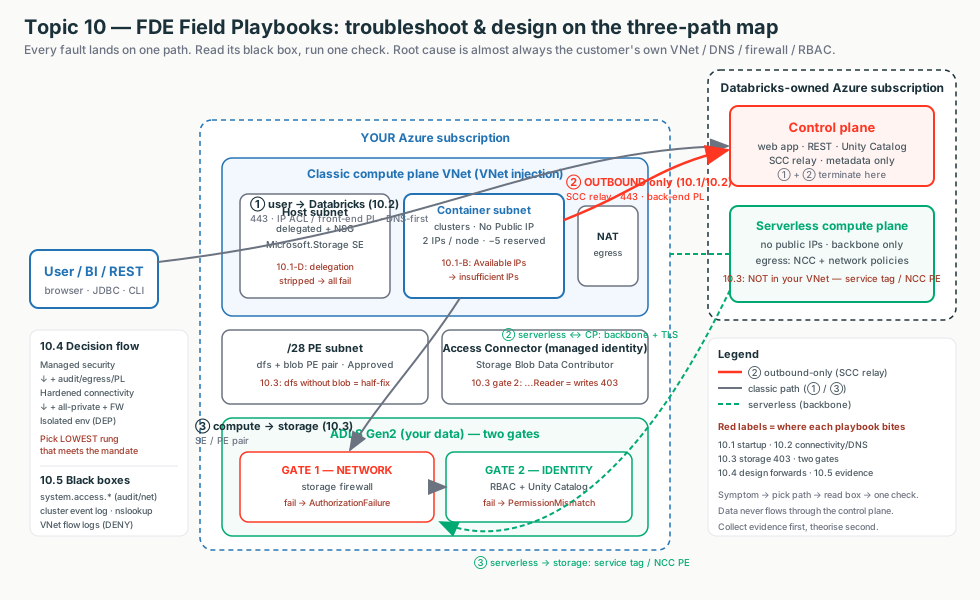
The line a customer wants to hear
"Every Databricks fault lands on one of three paths. We pick the path from the symptom, read that path's black box, and run one check — and the root cause is almost always in your own VNet, DNS, firewall or RBAC, not the platform. We design the same way, forwards: pick the lowest network rung that satisfies your mandate."
Terms used here (deep dive lives in the owning stage)
- SCC relay / NPIP
- Nodes have no public IP/inbound ports; they dial outbound 443 to the relay. Blocked egress → never registers. → Stage 3
- Private Endpoint / sub-resource
- A private IP for a service.
databricks_ui_api= UI/REST + relay;browser_authentication= SSO;dfs/blob= ADLS. → Stage 4 - Private DNS zone
- Must be linked to the client's VNet or the FQDN resolves to a public IP. → Stage 4
- NCC
- Account-level, regional object giving serverless private connectivity + egress policies. → Stage 5
- Service tag
AzureDatabricks(Serverless)— Microsoft-maintained IP set; use instead of IPs (they rotate). → Stage 0/4- System tables / flow logs
- UC-governed
system.access.*and Network Watcher VNet flow logs — the black boxes. → Stage 9
10.1 · Compute & networking startup failures
A starting cluster is a delivery truck leaving the depot — it needs a parking spot (vCPU quota), two licence plates (host + container IP), an open gate with the right pass (NSG/delegation), and a working road to head office (UDR/NAT → SCC relay). Switch the diagram between the five failure families and click a box to see what it is, why it's there, and what breaks.
The discriminator that trips people
An IP-exhaustion error says "cloud provider launch failure," which looks like quota. The tell is Available IPs on the container subnet ≥ requested nodes. Quota fine but IPs near zero → exhaustion. Subnet CIDR is immutable — size for peak on day one (2 IPs/node, −5 reserved).
Illustrative config — the forced-tunnel UDR that keeps the relay reachable
Terraform — keep control-plane traffic on the backbone via SERVICE TAGS; send the rest to the hub firewall. Missing the first routes = bootstrap timeout. Full module is the owning stage's hands-on artifact.
resource "azurerm_route" "adb_cp" {            # SCC relay + webapp + API
  address_prefix = "AzureDatabricks"           # SERVICE TAG, not a CIDR (IPs rotate)
  next_hop_type  = "Internet"                  # stays on the Microsoft backbone
}
resource "azurerm_route" "default_to_fw" {     # everything else -> hub firewall
  address_prefix         = "0.0.0.0/0"
  next_hop_type          = "VirtualAppliance"
  next_hop_in_ip_address = "10.100.0.4"        # hub Azure Firewall private IP
}
# Also required: routes for "Storage" (443) and "EventHub" (9093).
Portal: termination reason at Compute → cluster → Event log + Driver logs. Failed deploy → RG → Deployments (ARM error). Quota → Subscription → Usage + quotas. IPs → VNet → Subnets → Available IPs.
Post-2026-03-31 trap (verify)
New Azure VNets have no implicit internet egress — a new injected workspace needs a NAT gateway on both subnets or clusters can't reach the relay. Don't use an egress load balancer with SCC (SNAT port exhaustion).
10.2 · Connectivity — front-end, Private Link, DNS & SCC
The workspace URL is a phone number, DNS is the phonebook, Private Link is a private unlisted line. ~80% of "Private Link is broken" tickets are really "the phonebook gives out the wrong number" — so check DNS first. Switch the diagram between the four paths and click a box.
The DNS-first probe — from the FAILING network
Resolving from your laptop on the public internet proves nothing. A public IP / NXDOMAIN almost always means the Private DNS zone isn't linked to the client's VNet (the #1 omission).
Illustrative config — the probe + the forwarding fix
nslookup adb-1111111111111111.1.azuredatabricks.net   # from a jump-box in the VNet
#   GOOD: CNAME -> ...privatelink.azuredatabricks.net, Address 10.x.x.x
#   BAD : a public IP (20.x / 40.x) -> Private DNS zone not in use

az network private-dns link vnet list \
  --resource-group dns-rg --zone-name privatelink.azuredatabricks.net -o table
Fix: conditional-forward *.azuredatabricks.net, *.privatelink.azuredatabricks.net,
*.databricksapps.com → Azure DNS 168.63.129.16. Portal: Private DNS zone → Virtual network links / Recordsets; workspace → Networking → Private endpoint connections (Approved).
Region-wide SSO outage
There is exactly one browser_authentication endpoint per region. Deleting its
host workspace breaks login for every workspace in the region — set a delete lock.
Don't route the SCC relay through firewall deep inspection; allowlist relay FQDNs, not IPs.
10.3 · Storage & serverless access
Every storage read passes two turnstiles in order: the network gate (storage firewall — did the packet reach the building?) then the identity gate (RBAC + Unity Catalog — can you open this cabinet?). A 403 is just "a turnstile said no." Switch the diagram between classic and serverless — they take different doors.
Read the error to pick the gate, then ask "classic or serverless?"
AuthorizationFailure = network gate; AuthorizationPermissionMismatch
= identity gate; UC PERMISSION_DENIED (before any Azure call) = grant.
The #1 misdiagnosis: allowlisting your VNet for serverless — serverless isn't in it.
Illustrative config — wire the identity gate (the most common 403)
-- UC: credential -> external location -> grant. The GRANT is the missing line in many 403s.
CREATE STORAGE CREDENTIAL adls_cred WITH AZURE_MANAGED_IDENTITY
  ACCESS_CONNECTOR_ID = '/subscriptions/<sub>/resourceGroups/adb-rg/providers/Microsoft.Databricks/accessConnectors/adb-ac';
CREATE EXTERNAL LOCATION lake_ext URL 'abfss://data@mydatalake.dfs.core.windows.net/'
  WITH (STORAGE CREDENTIAL adls_cred);
GRANT READ FILES ON EXTERNAL LOCATION lake_ext TO `data-engineers`;
# Azure: the access-connector identity needs the DATA-PLANE role (not "...Reader").
az role assignment create --assignee-object-id <MI-principal-id> \
--assignee-principal-type ServicePrincipal --role "Storage Blob Data Contributor" \
--scope ".../storageAccounts/mydatalake"Portal: storage → Networking (firewall / PE connections / resource-instance rule for Microsoft.Databricks/accessConnectors); Account console → NCC (create → add PE rule → bind → approve PE on storage → wait ~10 min → restart serverless).
Half-fixes & limits
A dfs PE without the matching blob PE breaks ABFS in confusing
ways — always create the pair. Service Endpoint Policies are a no-op on Databricks-delegated subnets.
NCC: 10/region, 100 PEs/region, 50 workspaces/NCC; Premium required.
10.4 · Customer deployment patterns & the decision flow
Three reference architectures are three rungs of a security ladder, not three products. Start every customer on the bottom rung and climb only as far as their compliance mandate forces — each rung up bolts on billable Azure parts and DNS/firewall ops. Switch the diagram between the rungs.
The feature matrix (the interview answer)
| Feature | Managed security | Hardened | Isolated |
|---|---|---|---|
| VNet injection + SCC | Yes | Yes | Yes |
| Back-end Private Link | Optional | Yes | Yes |
| Front-end (workspace) Private Link | No | No | Yes |
| IP access lists (ws/account/OpenSharing) | No | Yes | Yes |
| Serverless egress control + NCC PEs | No | Yes | Yes |
| External firewall (DEP) | Optional | Optional | Yes |
| Public network access | Enabled | Enabled | Disabled |
Illustrative config — the delta from baseline to Isolated
resource "azurerm_databricks_workspace" "isolated" {
  sku                                   = "premium"               # all Private Link needs Premium
  public_network_access_enabled         = false                   # <-- Isolated: reject public
  network_security_group_rules_required = "NoAzureDatabricksRules" # <-- back-end PL needs this
  custom_parameters { no_public_ip = true /* + VNet/subnet/NSG associations */ }
}
# + databricks_ui_api PE (back-end) and databricks_ui_api + browser_authentication PE
#   (front-end, in the TRANSIT VNet) complete the Isolated inbound path.
Portal: Networking → SCC=Yes, own VNet=Yes (all rungs); Required NSG rules = AllRules (Managed) / NoAzureDatabricksRules (back-end PL); Public network access = Enabled (Managed/Hardened) / Disabled (Isolated).
Old deck names → current names
"Standard / Simplified deployment" → the Isolated environment inbound wiring; "secure/hardened workspace" → Hardened connectivity; "default/managed-VNet" → Managed security; "full DEP" → Isolated + external firewall. Subnet CIDR & VNet injection are deploy-time.
10.5 · Diagnostics, support & escalation
You're an air-crash investigator, not a witness. Your black boxes — system tables, VNet flow logs, diagnostic-settings export — only have a recording if you switched them on before the crash. Switch the diagram between the diagnostic layers and the escalation flow; click a box for what it answers and its retention.
Evidence has a shelf life
system.access.inbound_network is 30 days; node_timeline 90d;
cluster event logs die with the cluster. Turn on logging before go-live, or you
can't root-cause later. Collect first, theorise second.
Illustrative config — read the network-denial black boxes
SELECT event_time, source.ip AS src_ip, authenticated_as, policy_outcome, rule_label
FROM   system.access.inbound_network                       -- 30-day retention
WHERE  event_time >= current_timestamp() - INTERVAL 2 HOUR ORDER BY event_time DESC;

SELECT event_time, destination_type, destination,
       dns_event.rcode AS dns_rcode, storage_event.rejection_reason
FROM   system.access.outbound_network                      -- DNS vs IP vs STORAGE denial
WHERE  event_time >= current_date() - INTERVAL 1 DAY ORDER BY event_time DESC;
# Enable VNet flow logs BEFORE incidents — a 'D' record names the rule + 5-tuple that dropped the packet.
az network watcher flow-log create --resource-group rg-network --name adb-vnet-flowlog \
--location eastus --vnet adb-vnet --storage-account stflowlogseastus \
--traffic-analytics true --workspace <log-analytics-resource-id>Status first: status.azuredatabricks.net + Service Health + Resource health. Escalate: Help + support → Create a support request → Technical → Azure Databricks → the workspace's subscription (wrong subscription = the engineer can't see your resources).
SIEM coverage gap & NSG flow-log retirement
Diagnostic settings omit clusterPolicies/groups/vectorSearch — pair
with the audit system table. NSG flow logs are being retired in favour of VNet flow logs
(verify the date). Never promise Sev-A speed on a Developer support plan.
Uses, edge cases & limitations
Uses: first-15-minutes triage on any startup / connectivity / storage / serverless escalation; the decision conversation that scopes a deployment; standing up logging before go-live; packaging an escalation that resolves on round-trip one.
Edge cases:
- Serverless ≠ classic on paths ②/③ — no subnet, no static IP; use NCC +
the
AzureDatabricksServerlessservice tag, not your VNet (the #1 misdiagnosis). - Diagnosing from the wrong network —
nslookupfrom a public laptop returns the public IP and proves nothing. - Half-fixes:
dfsPE withoutblob; service endpoint on one subnet only;Storage Blob Data Reader(reads work, writes 403). - Shared blast radius: deleting the web-auth host workspace breaks login region-wide; one missing VNet link breaks every machine on that VNet.
- Post-2026-03-31 new VNets have no default outbound — new workspace can't reach the relay even when DNS is perfect.
- Short retention:
inbound_network30d,node_timeline90d, cluster event logs die with the cluster — export early. - Service Endpoint Policies are a no-op on Databricks-delegated subnets.
Limitations: Private Link / IP access lists / CMK / egress control / diagnostic logs require Premium; NCC quotas (10/region, 100 PEs/region, 50 workspaces/NCC); subnet CIDR + VNet injection are deploy-time; NSG-rules / public-access changes need all compute stopped and a 15+ min window; many networking system tables are Public Preview (free now, behaviour can change) — flag preview status.
Decision guide — what an architect recommends
Bake into every deployment
- NAT gateway on both subnets (post-2026-03-31)
- Container subnet sized for peak (2 IPs/node, −5)
- SCC on; never hand-edit the managed NSG rules
- Conditional-forward the three DNS suffixes to 168.63.129.16
- Dedicated, delete-locked web-auth workspace per region
- System tables + VNet flow logs + SIEM export before go-live
Match the rung to the mandate
- Non-regulated analytics → Managed security
- Audit + access control, public login OK → Hardened
- "No public / no exfil" mandate → Isolated (+ firewall = DEP)
- Free-backbone storage acceptable → Service Endpoint
- "No public IP on storage" → Private/NCC endpoint
- Scarce RFC 1918 / huge autoscale → overlay IP-exhaustion (RFC 6598 + serverless)
Don't…
- Sell the vault to the coffee shop (default everyone to Isolated)
- Route the SCC relay through the DEP firewall (allow it directly)
- Allowlist your VNet for serverless (use service tag / NCC PE)
- Create a
dfsPE without theblobPE - Use
Storage Blob Data Readerwhen writes are needed - Build new tooling on NSG flow logs (retiring) or file on the wrong subscription
Don't misread the symptom
- IP exhaustion ≠ quota — check container subnet Available IPs
- "Public access not allowed" ≠ policy bug — usually a DNS leak
AuthorizationFailure≠PermissionMismatch— network vs identity gate- Diagnose DNS from the failing network, not your laptop
- Don't debug before checking the status page
Rule of thumb
Symptom → pick the path → read the box → run ONE check. Design forwards: pick the lowest rung that satisfies the mandate, never the highest — climbing is cheap to spec but expensive to operate. And turn the logging black box on before go-live, because evidence has a shelf life.
Customer Q&A — what the security/network team actually asks
nslookup, the storage error — and run one check. The root cause is almost always in your own VNet,
DNS, firewall or RBAC, not the platform. We design the same way, forwards: pick the lowest network rung that
satisfies your mandate, and turn logging on before go-live."Common asks & the answer
| Customer asks… | Architect answers… |
|---|---|
| "Our cluster won't start — is it Databricks or our network?" | Read the termination reason; 4 of 5 are quota/IP/NSG-UDR/delegation — your network, not the platform. |
| "Databricks is down — is it your platform?" | One nslookup from the failing network; if the URL doesn't return a private IP, the break is in your DNS linking. |
| "We allowlisted our VNet but serverless still gets 403." | Serverless isn't in your VNet — allow the AzureDatabricksServerless service tag or add an NCC private endpoint. |
| "Which architecture do you recommend?" | Ask the four mandate questions (regulatory? exfil? ingress/egress control? data class?) and name the rung. We don't lead with the vault. |
| "Where do our audit logs go / how long are they kept?" | system.access.audit (recommended) and/or diagnostic settings → Log Analytics; audit 365d, inbound only 30d — export to a SIEM for more. |
| "Do we open tickets with Microsoft or Databricks?" | Azure Databricks is first-party — file in the Azure portal (Help + support → Technical → Azure Databricks); the account team handles non-break-fix asks. |
What breaks in the field — and the FIRST check
insufficient IP addresses
Container subnet ran out (2 IPs/node, −5 reserved).First check: VNet → Subnets → Available IPs vs requested nodes.
bootstrap / NPIP tunnel timeout
Node can't reach the relay.First check: NSG outbound 443 to AzureDatabricks + UDR/firewall allow relay FQDN + NAT attached.
Every cluster fails instantly
Subnet delegation or NSG association dropped.First check: subnet Delegation = Microsoft.Databricks/workspaces + NSG attached.
"Control Plane Request Failure"
Back-end DNS/PE/egress broken.First check: nslookup from a workspace-VNet jump-box → back-end PE private IP + relay egress.
Login spins / loops
Web-auth record missing or host workspace deleted.First check: nslookup <region>.pl-auth... + web-auth host workspace exists.
Serverless 403, classic fine
Serverless isn't in your VNet.First check: NSP service-tag rule / NCC PE ESTABLISHED + bound + restarted.
AuthorizationPermissionMismatch
Identity gate: wrong RBAC role.First check: access-connector identity has Storage Blob Data Contributor.
Timeout but DNS fine
NSG/UDR dropping the packet.First check: VNet flow-log DENY record + effective NSG rules/routes.
Support case stalls day one
Filed on the wrong subscription.First check: case is on the workspace's subscription + right severity/plan.
Four questions to ask before recommending an architecture
- Is there a regulatory mandate that traffic never touches the public internet?
- Do you need data-exfiltration protection (block egress to arbitrary internet)?
- Do you need ingress allowlisting + egress control + private data, but public login is OK?
- Is RFC 1918 scarce or will a workspace autoscale to hundreds of nodes (overlay IP-exhaustion)?